An icon is an image, picture, or representation. To display the icon, we have defined an image.

Show Icon Displayer


In this section, you will studied how to display a single icon one or more
times in a row.
An icon is an image, picture, or representation. To display the icon, we have defined an image. The class
ImageIcon is
responsible to paint the icons from Images. The MediaTracker preloads the
images that are created from a URL,
filename or byte array.
The variable space is defined to set the space between the images. The
method createEmptyBorder(this.space, this.space,this.space, this.space) creates an empty border that takes up
space. The class Insets defines the borders of a container which specifies
the space at each of its edges that a container must leave .
The method getPreferredSize() is used to determine how the
layout should be arranged. The method getClipBounds() gets a rectangle
and encloses the clipping region of the Graphics object. To give the blending and transparency
effects with graphics and images
for combining source and destination pixels, the class AlphaComposite is
used.
Following code returns an ImageIcon:
protected static ImageIcon createImageIcon(String path) {
java.net.URL imgURL = IconDisplayerExample.class.getResource(path);
return new ImageIcon(imgURL);
} |
Here is the code of IconDisplayerExample.java
import java.awt.*;

import javax.swing.*;


public class IconDisplayerExample extends JComponent {

  private Icon icon;

  private int numOfImages = 2;

  private int space = 5;

  private Rectangle rect1 = new Rectangle();

  private Rectangle rect2 = new Rectangle();

public IconDisplayerExample(Icon icon, int numOfImages, int space) {

  this.icon = icon;

  if (numOfImages > 0) {

  this.numOfImages = numOfImages;

  }

  if (this.space > 0) {

  setBorder(BorderFactory.createEmptyBorder(this.space, this.space,

  this.space, this.space));

  }

  }

  public Dimension getPreferredSize() {

  Insets insets = getInsets();

  return new Dimension(icon.getIconWidth() * numOfImages + space

  * (numOfImages - 1) + insets.left + insets.right,

  icon.getIconHeight() + insets.top + insets.bottom);

 }

  public Dimension getMinimumSize() {

  Insets insets = getInsets();

  return new Dimension(icon.getIconWidth() + insets.left

  + insets.right, icon.getIconHeight() + insets.top

  + insets.bottom);

 }

  protected void paintComponent(Graphics g) {

  Insets insets = getInsets();

  int iconWidth = icon.getIconWidth();

  int p = getWidth() - insets.right - iconWidth;

  int q = insets.top;

  boolean shaded = false;

  Graphics2D g2 = (Graphics2D) g.create();

  g.getClipBounds(rect2);

  while (p >= insets.left) {

  rect1.setBounds(p, q, iconWidth, icon

  .getIconHeight());

  if (rect1.intersects(rect2)) {

  icon.paintIcon(this, g2, p, q);

  }

  p -= (iconWidth + space);

  if (!shaded) {

  g2.setComposite(AlphaComposite.getInstance(

  AlphaComposite.SRC_OVER, 0.1f));

  shaded = true;

  }

  }

  g2.dispose();

  }

 protected static ImageIcon createImageIcon(String path) {

  java.net.URL imgURL = IconDisplayerExample.class.getResource(path);

  return new ImageIcon(imgURL);

 }

 private static void createAndShowGUI() {

  JFrame frame = new JFrame("Icon Displayer Example");

  frame.setSize(400,150);

  ImageIcon imageIcon = createImageIcon("alert.gif");

  IconDisplayerExample iconDisplayer = new IconDisplayerExample(

   imageIcon, 6, -1);

  frame.getContentPane().add(iconDisplayer, BorderLayout.CENTER);

  frame.setVisible(true);

  }

  public static void main(String[] args) {

  javax.swing.SwingUtilities.invokeLater(new Runnable() {

  public void run() {

  createAndShowGUI();

  }

  });

  }

}
|
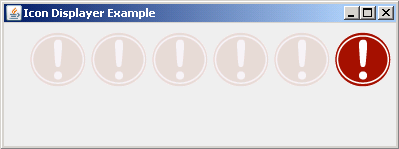
Output will be displayed as:
Download Source Code