In this section, we are going to develop a small Java Graphics application that creates a ball which bounce with the help of thread in Graphics.

Bouncing Thread Example


In this section, we are going to develop a small Java Graphics application
that creates a ball which bounce with the help of thread
in Graphics.
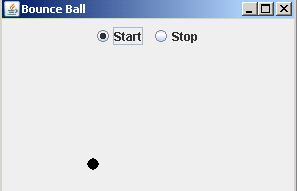
In the example, a method contentPane() is defined that contains the canvas in the center of the frame. Two
Radio Buttons Start and Stop are
defined in the panel. On pushing the button 'Start', class ActionListener
is called and the ball starts bouncing. On pushing 'Stop', ActionListener
is called and the frame will get close.
The contentPane.add(panel,
"North") gives the position to the panel of the buttons on the
frame. The dimensions for the ball are defined. The shape of the ball is given
by graphics.fillOval(p, q, P, Q).
Here is the code of BounceThreadExample
import java.awt.*;

import javax.swing.*;

import java.awt.event.*;


public class BounceThreadExample {

  public static void main(String[] args) {

  JFrame frame = new BounceThread();

  frame.show();

  }

}

class BounceThread extends JFrame {

  private JPanel canvas;

  public BounceThread() {

  setSize(300, 200);

  setTitle("Bounce Ball");


  Container container = getContentPane();

  canvas = new JPanel();

  container.add(canvas, "Center");

  JPanel panel = new JPanel();

  add(panel, "Start", new ActionListener() {

  public void actionPerformed(ActionEvent evt) {

  Ball ball = new Ball(canvas);

  ball.start();

  }

  });

 add(panel, "Stop", new ActionListener() {

 public void actionPerformed(ActionEvent evt) {

 canvas.setVisible(false);

 System.exit(0);

  }

  });

 container.add(panel, "North");

  }

  public void add(Container container, String title, ActionListener

        listener) {

 JRadioButton button = new JRadioButton(title);

 container.add(button);

 button.addActionListener(listener);

  }

}

class Ball extends Thread {

 JPanel box;

 int P = 12, Q = 12, p = 0, q = 0, dp = 3, dq = 3;

  public Ball(JPanel pan) {

  box = pan;

  }

public void draw() {

  Graphics g = box.getGraphics();

  g.fillOval(p, q, P, Q);

  g.dispose();

  }

 public void move() {

  if (!box.isVisible())

  return;

  Graphics g = box.getGraphics();

  g.setXORMode(box.getBackground());

  g.fillOval(p, q, P, Q);

  p += dp;

  q += dq;

  Dimension d = box.getSize();

  if (p < 0) {

 p = 0;

  dp = -dp;

  }

  if (p + P >= d.width) {

  p = d.width - P;

  dp = -dp;

  }

  if (q < 0) {

  q = 0;

  dq = -dq;

  }

  if (q + Q >= d.height) {

  q = d.height - Q;

  dq = -dq;

  }

  g.fillOval(p, q, P, Q);

  g.dispose();

  }


  public void run() {

  try {

  draw();

  for (int i = 1; i <= 800; i++) {

  move();

  sleep(5);

  }

  } catch (Exception e) {

  }

  }

      }
|
After pushing the start button, ball starts bounce
Download Source Code