To show color components, we have used the class DirectColorModel. The DirectColorModel class shows pixel values that represent RGB color and alpha information and pack into a single int, short, or byte quantity.

Show Color Components


This section shows you color components.
To show color components, we have used the class DirectColorModel. The DirectColorModel class shows pixel values that represent RGB color and alpha information and pack into a single int, short, or byte quantity.
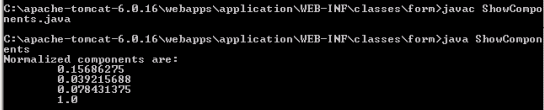
The minimum normalized component value must be 0.0, and the maximum value must be 1.0. There are three color samples in the pixel values and a single alpha sample.
Following code returns an array of all the components in a normalized form.
| component2 = colorModel.getNormalizedComponents(component1,0,null,0); |
Here is the code of ShowComponents.java
import java.awt.image.DirectColorModel;
|
Output will be displayed as: