
jQuery Load Content


In this section you will learn how to load content of a text file using jQuery and show it on the use browser. This example shows you how to load the content of simple text file and then show on the text box.
Our jQuery Load Content example will do the following work
- Web page is displayed with a button "Load Content" and a blank text box
- User clicks on the "Load Content" button.
- jQuery loads the context of a text file "testFile.txt" and displays in the text area
After completing this example you will be able to use jQuery to Load the content from server side text file and show it to the user.
Code:
1. HTML Page
Here is the code of "displayContent.html" file
| <html xmlns="http://www.w3.org/1999/xhtml" xml:lang="en" lang="en"> <head> <title>Show Content</title> <script type="text/javascript" src="jquery-1.2.6.js"></script> <script type="text/javascript"> function contentDisp() { $.ajax({ url : "textContent.php", success : function (data) { $("#contentArea").html(data); } }); } </script> </head> <body> <table width="100%" border=0> <tr><td> </td><td> </td></tr> <tr><td> </td><td> </td></tr> <tr><td width="30%" > </td><td style="color:blue;" width="70%"> Download Content Example</td></tr>
<tr><td> </td><td ><input type="button" value="Click"
onClick="
<tr><td> </td><td> |
2. jQuery code in the page
The following jQuery code retrieves the data from server and display in the text area.
function contentDisp()
{
$.ajax({
url : "textContent.php",
success : function (data) {
$("#contentArea").html(data);
}
});
}
3. Content of the text file
Here is the content of the text file:
| Welcome to RoseIndia.Net jQuery Tutorials Learn how you can do a lot of work with small code. jQuery is here to help us in achieving high result with less coding. jQuery is great!!!! |
4. Program screen shot
Open your browse and type http://localhost/displayContent.html. Your browser should look like:
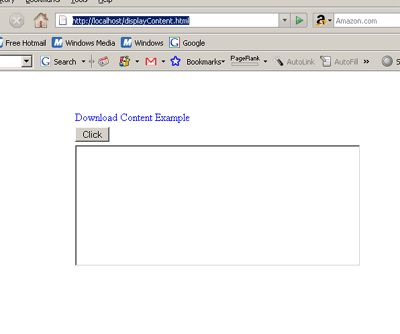
Now click on the "Click" button. The program will fetch the text data from database and display in the text area as shown below:
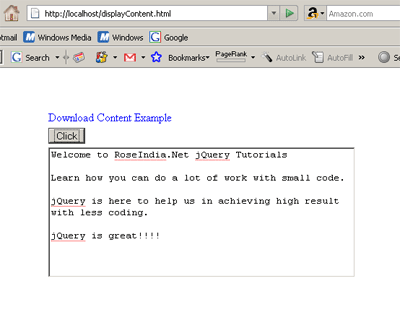
In this example you leaned how to fetch the text data from server and display in the text area.
Learn from experts! Attend jQuery Training classes.