
jQuery Drop Down Menu


In this JQuery tutorial we will develop a program to make Drop Down menu
Steps to develop the Drop Down menu .
Step 1:
Create a new file (suckerfish.html) and add the following code into it:
| <!DOCTYPE html PUBLIC "-//W3C//DTD XHTML 1.0 Strict//EN" "http://www.w3.org/TR/xhtml1/DTD/xhtml1-strict.dtd"> <html xmlns="http://www.w3.org/1999/xhtml" xml:lang="en" lang="en"> <head> <meta http-equiv="content-type" content="text/html; charset=iso-8859-1" /> <title>jQuery Drop Down Menu</title> <script type="text/javascript" src="jquery.js"></script> <script type="text/javascript"> $(document).ready(function(){ $("#van-one li").hover( function(){ $("ul", this).fadeIn("slow"); }, function() { } ); if (document.all) { $("#van-one li").hoverClass ("sfHover"); } }); $.fn.hoverClass = function(c) { return this.each(function(){ $(this).hover( function() { $(this).addClass(c); }, function() { $(this).removeClass(c); } ); }); }; </script> <style type="text/css"> /* vanigation */ .van, .van ul { list-style: none; margin: 0; padding: 0; } .van { font-family: Arial, Helvetica, sans-serif; z-index: 100; position: relative; } .van li { border-left: 1px solid #000; float: left; margin: 0; padding: 0; position: relative; } .van li a, .van li a:link, .van li a:active, .van li a:visited { font: bold 1.22em/25px Arial, Helvetica, sans-serif; background: #EFEFEF; color: #ff0000; display: block; padding: 0 9px; text-transform: lowercase; text-decoration: none; } .van li a:hover { background: #ccc; color: #000; } #van-one li:hover a, #van-one li.sfHover a { background: #ccc; color: #000; } #van-one li:hover ul a, #van-one li.sfHover ul a { background: #F0ff0f; color: #000000; } #van-one li:hover ul a:hover, #van-one li.sfHover ul a:hover { background: #ccc; color: #000; } .van ul { background: #565656; border-bottom: 1px solid #000; list-style: none; margin: 0; width: 100px; position: absolute; top: -999em; left: -1px; } .van li:hover ul, .van li.sfHover ul { top: 25px; } .van ul li { border: 0; float: none; } .van ul a { border: 1px solid #000; border-bottom: 0; padding-right: 20px; width: 80px; white-space: nowrap; } .van ul a:hover { background: #ccc; color: #000; } </style> </head> <body> <ul id="van-one" class="van"> <li> <a href="#item1">item A</a> <ul> <li><a href="#itemA1">item A1</a></li> <li><a href="#itemA2">item A2</a></li> <li><a href="#itemA3">item A3</a></li> <li><a href="#itemA4">item A4</a></li> </ul> </li> <li> <a href="#item2">item B</a> <ul> <li><a href="#itemB1">item B1</a></li> <li><a href="#itemB2">item B2</a></li> </ul> </li> <li> <a href="#item3">item C</a> <ul> <li><a href="#itemC1">item C1</a></li> <li><a href="#itemC2">item C2</a></li> </ul> </li> </ul> <br clear="all" /> </body> </html> |
Program explanation:
The following code includes the jQuery JavaScript library file:
|
<script type="text/javascript" src="jquery.js"></script> The Code $("#van-one li").hover This function works when generate an hover event and having correponding style css. van li a:hover {
|
we using ul (unordered list) and impelement a style on it.
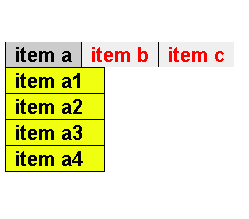
Check online demo of the application
Learn from experts! Attend jQuery Training classes.