With Fixed Max-Height


In this JQuery tutorial we will develop a program that Auto generate of textarea with fixed Max-Height.
Steps to develop the Auto generate of a Textarea with fixed Max-Height.
Step 1:
Create a new file (autoGrowText1.html) and add the following code into it:
| <!DOCTYPE HTML PUBLIC "-//W3C//DTD HTML 4.01//EN" "http://www.w3.org/TR/html4/strict.dtd"> <html lang="en"> <head> <meta http-equiv="Content-Type" content="text/html; charset=utf-8"> <meta http-equiv="Content-Style-Type" content="text/css"> <meta http-equiv="Content-Script-Type" content="text/javascript"> <title>Tabs</title> <script type="text/javascript" src="jquery.js"></script> <script type="text/javascript" src="script/jquery.autogrow.js"></script> <script type="text/javascript"> $(document).ready (function() { $('textarea.expandText').autogrow({ }); }); </script> <style type="text/css"> textarea.expandText { line-height: 10px; } </style> </head> <body> No Min-Height and max-height 100Px <textarea style="width: 300px; max-height: 100px;" class="expandText" name="myTextarea"> </textarea> </body> </html> |
Program explanation:
The following code includes the jQuery JavaScript library file:
<script type="text/javascript" src="jquery.js"></script>
<script type="text/javascript" src="script/jquery.autogrow.js"></script>
The Code
$('textarea.expandText').autogrow();
This function works auto generate the textarea of id "expandText"
and having correponding style css.
textarea.expandText {
line-height: 10px;
}
<textarea style="width: 300px; max-height: 100px;" class="expandText" name="myTextarea">
This increase the height 10px per line
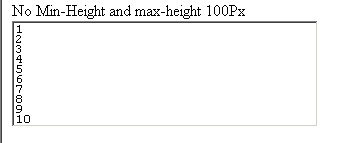
In the textarea we set the max-height:100px;
Output:
Max Height : 100 px
Check online demo of the application
Learn from experts! Attend jQuery Training classes.
Learn from experts! Attend jQuery Training classes.