
jQuery to Post Data Check


In this first jQuery tutorial we will develop a simple program that checking the data Post to server and displays on the user browser. In this example we will be calling a server side PHP script . You can easily replace PHP with JSP, or ASP program.
Steps to develop the Post Data Check program
Step 1:
Create php file to that prints the response from the server. Here is the code of PHP script (comment.php).
| <? if($_POST['name']!="" && $_POST['comment']!="") echo "success"; ?> |
Step 2:
Write HTML page to call the comment.php. Create a new file (formPost.html) and add the following code into
   <!DOCTYPE HTML PUBLIC "-//W3C//DTD HTML 4.0 Transitional//EN">
<HTML>

<head>
    <script type="text/javascript" src="script/jquery.js"></script>
    <script type="text/javascript" src="script/jquery.form.js"></script>

    <script type="text/javascript">
        // wait for the DOM to be loaded
        $(document).ready(function() {
            // bind 'myForm' and provide a simple callback function
            $('#myForm').ajaxForm(function(data) {
				if(data=="success")
                alert("Thank you for your comment!");
            });
        });
    </script>
</head>


 <BODY>
<form id="myForm" action="comment.php" method="post">
    Name: <input type="text" name="name" />
    Comment: <textarea name="comment"></textarea>
    <input type="submit" value="Submit Comment" />
</form>
 </BODY>
</HTML>
|
Program explanation:
The following code includes the jQuery JavaScript library file:
| <script type="text/javascript" src="script/jquery.js"></script> <script type="text/javascript" src="script/jquery.form.js"></script> |
On the Form submission function is called:
The code
$('#myForm').ajaxForm(function(data)
url : "comment.php",
...
makes ajax call to comment.php file.
Following code intercepts the ajax call success and then post the data with form id "myForm".
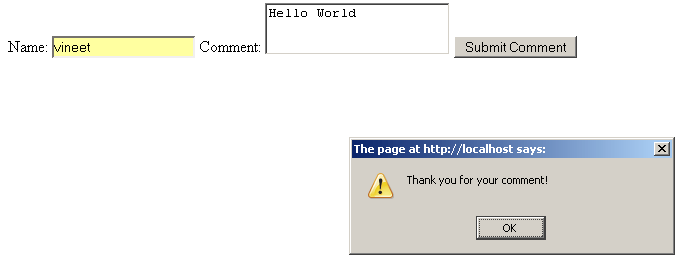
When the Post Data Successfully Then alert Message Print.
When you run the program in browser it will look like following screen shot:
Check online demo of the application
Learn from experts! Attend jQuery Training classes.