Home Ajax Jquery jQuery UI Widget : Dialog


jQuery UI Widget : Dialog
Posted on: April 18, 2011 at 12:00 AM
This page discusses - jQuery UI Widget : Dialog

jQuery UI Widget : Dialog


jQuery UI Widget : Dialog

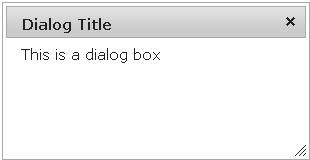
This widget is used to create a floating window that contains a title bar and a content area. The dialog window can be moved, resized and closed with the '+' icon by default.

f the content length exceeds the maximum height, a scrollbar will automatically appear.

A bottom button bar and semi-transparent modal overlay layer are common options that can be added.

A call to $(foo).dialog() will initialize a dialog instance and will auto-open the dialog by default. If you want to reuse a dialog, the easiest way is to disable the "auto-open" option with: $(foo).dialog({ autoOpen: false }) and open it with $(foo).dialog('open'). To close it, use $(foo).dialog('close').

To create a dialog box containing text of a element like div, we use :

 $("#dialog").dialog();

For options, events ,method and theming click here

EXAMPLE :

dialog.html

<!DOCTYPE html>
<html>
<head>
<link href="http://ajax.googleapis.com/ajax/libs
/jqueryui/1.8/themes/base/jquery-ui.css" rel="stylesheet" type="text/css"/>
<script src="http://ajax.googleapis.com/ajax/libs/jquery/1.4/jquery.min.js">
</script>
<script src="http://ajax.googleapis.com/ajax/libs/jqueryui/1.8/jquery-ui.min.js">
</script>
<script>
$(document).ready(function() {
$("#dialog").dialog();
});
</script>
</head>
<body style="font-size:62.5%;">

<div id="dialog" title="Dialog Title">This is a dialog box</div>

</body>
</html>

Output :

Download Source Code

Learn from experts! Attend jQuery Training classes.

Related Tags for jQuery UI Widget : Dialog:


More Tutorials from this section

Ask Questions?    Discuss: jQuery UI Widget : Dialog  

Post your Comment


Your Name (*) :
Your Email :
Subject (*):
Your Comment (*):
  Reload Image


Ask Questions?

If you are facing any programming issue, such as compilation errors or not able to find the code you are looking for.

Ask your questions, our development team will try to give answers to your questions.