Create Expand Bar in SWT


This section illustrates you how to create an Expand Bar.
SWT provides an application of creating a Expand Bar using the classes
ExpandBar and ExpandItem. The class ExpandBar provides the
layout of selectable expand bar items.
The layout.VerticalSpacing specifies the number of pixels
between the bottom edge and the top edge. The method setHeight() of class
ExpandItem sets the height of the Expand bar. The method setControl(composite)
sets the control that is shown when the item is expanded. The method
composite.computeSize(SWT.DEFAULT, SWT.DEFAULT).y) returns the preferred
size.
Here is the code of ExpandBarExample.java
import org.eclipse.swt.*;

import org.eclipse.swt.layout.*;

import org.eclipse.swt.widgets.*;

import org.eclipse.swt.graphics.*;


public class ExpandBarExample {

public static void main (String [] args) {

  Display display = new Display ();

  Shell shell = new Shell (display);

  shell.setLayout(new FillLayout());

  shell.setText("Expand Bar");

  ExpandBar bar = new ExpandBar (shell, SWT.V_SCROLL);


  Composite composite = new Composite (bar, SWT.NONE);

  GridLayout layout = new GridLayout ();

  layout.marginLeft = layout.marginTop=

  layout.marginRight=layout.marginBottom=8;

  layout.verticalSpacing = 10;

  composite.setLayout(layout);

  Label label = new Label (composite, SWT.NONE);

  label.setText("This is Bar 1");

  ExpandItem item1 = new ExpandItem (bar, SWT.NONE, 0);

  item1.setText("Bar 1");

  item1.setHeight

  (composite.computeSize(SWT.DEFAULT, SWT.DEFAULT).y);

  item1.setControl(composite);


  composite = new Composite (bar, SWT.NONE);

  layout = new GridLayout (2, false);

  layout.marginLeft = layout.marginTop=

   layout.marginRight=layout.marginBottom=8;

  layout.verticalSpacing = 10;

  composite.setLayout(layout);

  label = new Label (composite, SWT.NONE);

  label.setText("This is Bar2");

  ExpandItem item2 = new ExpandItem (bar, SWT.NONE, 1);

  item2.setText("Bar 2");

  item2.setHeight

  (composite.computeSize(SWT.DEFAULT, SWT.DEFAULT).y);

  item2.setControl(composite);


  composite = new Composite (bar, SWT.NONE);

  layout = new GridLayout (2, true);

  layout.marginLeft = layout.marginTop=

   layout.marginRight=layout.marginBottom=8;

  layout.verticalSpacing = 10;

  composite.setLayout(layout);

  label = new Label (composite, SWT.NONE);

  label.setText("This is Bar3");

  ExpandItem item3 = new ExpandItem (bar, SWT.NONE, 2);

  item3.setText("Bar 3");

  item3.setHeight

   (composite.computeSize(SWT.DEFAULT, SWT.DEFAULT).y);

  item3.setControl(composite);

  bar.setSpacing(6);

  shell.setSize(300, 200);

  shell.open();

  while (!shell.isDisposed ()) {

  if (!display.readAndDispatch ()) {

  display.sleep ();

  }

  }

  display.dispose();

}

}
|
Output will be displayed as:
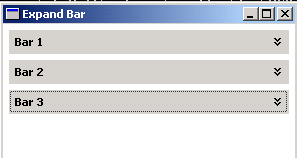
Download Source Code
