iBatis Update -Updating data of a table


Add, Update and Delete are very common and essential
feature for any database application. In this iBatis tutorial we have already
explained about Insert and Delete in Java using iBatis, now this section will introduce you how you can update data
in data table with the iBatis. In iBatis executing an update statement is very
simple. For updating you have to add SQL "Update" statement in SQL
mapping file "Contact.xml". Contact.java and SqlMapConfig.xml
is same as in our previous examples.
iBatis update statement Example
Contact.java
public class Contact {
|
SqlMapConfig.xml
| <?xml version="1.0" encoding="UTF-8"?> <!DOCTYPE sqlMapConfig PUBLIC "-//ibatis.apache.org//DTD SQL Map Config 2.0//EN" "http://ibatis.apache.org/dtd/sql-map-config-2.dtd"> <sqlMapConfig> <settings useStatementNamespaces="true"/> <transactionManager type="JDBC"> <dataSource type="SIMPLE"> <property name="JDBC.Driver" value="com.mysql.jdbc.Driver"/> <property name="JDBC.ConnectionURL" value="jdbc:mysql://192.168.10.112:3306/vin"/> <property name="JDBC.Username" value="root"/> <property name="JDBC.Password" value="root"/> </dataSource> </transactionManager> <sqlMap resource="Contact.xml"/> </sqlMapConfig> |
iBatis Update Query
Here in our example we are updating table with an id as specified in our parameter and therefore for "id" we have assigned "parameterClass" property value to "long".
Contact.xml
| <?xml version="1.0" encoding="UTF-8"?> <!DOCTYPE sqlMap PUBLIC "-//ibatis.apache.org//DTD SQL Map 2.0//EN" "http://ibatis.apache.org/dtd/sql-map-2.dtd"> <sqlMap namespace="Contact"> <!--- Showing all data of table --> <select id="getAll" resultClass="Contact"> select * from contact </select> <!--- Update data of Contact table --> <update id="updateById" parameterClass="long"> update Contact set lastName = 'Raghuwanshi' where id=#id# </update> </sqlMap> |
Now we can execute update command from our java program by the following code as:
sqlMap.update("Contact.updateById",contactId);
|
Full source code of IbatisUpdate.java is as follows:
IbatisUpdate.java
import com.ibatis.common.resources.Resources;
|
To run this example program of Update statement follow these steps:
- Create and Save Contact.java and SqlMapConfig.xml
- Compile Contact.java
- make Contact.xml
- create and save IbatisUpdate.java and compile it
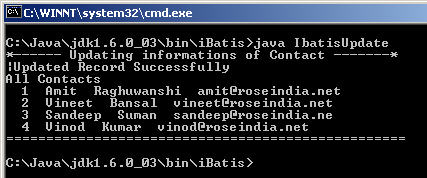
- On executing IbatisUpdate class file you will get this output
Output: