iBatis ResultMap example


If you are working with iBatis Result Map then you must know that iBatis result maps are used to provide mapping between the result of database query and object properties of it. And it is the most common and important feature of iBatis. This section of iBatis tutorial is just an simple introduction to ResultMap. This will familiarize you that how you can execute an query with ResultMap. Our Contact.java and SqlMapConfig.xml file have no change and these are as same as in our previous examples. Code for Contact POJO is as follows:
Contact.java
public class Contact {
|
SqlMapConfig.xml
| <?xml version="1.0" encoding="UTF-8"?> <!DOCTYPE sqlMapConfig PUBLIC "-//ibatis.apache.org//DTD SQL Map Config 2.0//EN" "http://ibatis.apache.org/dtd/sql-map-config-2.dtd"> <sqlMapConfig> <settings useStatementNamespaces="true"/> <transactionManager type="JDBC"> <dataSource type="SIMPLE"> <property name="JDBC.Driver" value="com.mysql.jdbc.Driver"/> <property name="JDBC.ConnectionURL" value="jdbc:mysql://192.168.10.112:3306/vin"/> <property name="JDBC.Username" value="root"/> <property name="JDBC.Password" value="root"/> </dataSource> </transactionManager> <sqlMap resource="Contact.xml"/> </sqlMapConfig> |
For ResultMap we have to use <resultMap></resultMap> tag. It consists of an id which is required to run this resultMap in our <select> tag's resultMap attribute. Here is the full code of Contact.xml .
Contact.xml
| <?xml version="1.0"
encoding="UTF-8"?> <!DOCTYPE sqlMap PUBLIC "-//ibatis.apache.org//DTD SQL Map 2.0//EN" "http://ibatis.apache.org/dtd/sql-map-2.dtd"> <sqlMap namespace="Contact"> <!--- Showing data by ID --> <resultMap id="result" class="Contact"> <result property="id" column="id"/> <result property="firstName" column="firstName"/> <result property="lastName" column="lastName"/> <result property="email" column="email"/> </resultMap> <select id="getById" resultMap="result"> |
To run resultMap example we have to include following line in our java code.
sqlMap.queryForObject("Contact.getById",new Integer(1));
|
Here we have passed id value "1" for showing all information on that id.
IbatisResultMap.java
import com.ibatis.common.resources.Resources;
|
To run this example
- Create and Save Contact.xml and SqlMapConfig.xml
- Create and compile Contact.java
- Create and compile IbatisResultMap.java and
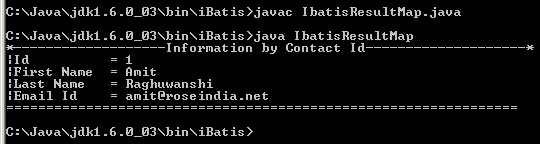
- On executing IbatisResultMap class file all information on that id "1" will be displayed.
Output: