More Tutorials| Bioinformatics| Open Source| Photoshop| Questions?


Search Tutorials

Latest Questions
Comments
 
iBatis-Inserting data into database 
 

The greatest feature of iBatis is it?s simplicity, and that is the only reason of being it easier to use in any database application.


iBatis-Inserting data into database


The greatest feature of iBatis is it’s simplicity, and that is the only reason of being it easier to use in any database application. iBatis makes it really simple to use a database with Java or any other Microsoft applications. In this section we will introduce you with an example which is inserting a row into database. And for this we are using MySQL as a database it is the same one we have used  in our previous example. The table name is "Contact" and we have used  two files "Contact.java" and  "SqlMapConfig.xml" as we did in previous example. 


Contact.java

public class Contact {
  private String firstName; 
  private String lastName;   
  private String email;  
  private int id;

  public Contact() {}
  
  public Contact(
    String firstName,
    String lastName,
    String email
) {
    this.firstName = firstName;
    this.lastName = lastName;
    this.email = email;
    }
  
  public String getEmail() {
    return email;
  }
  public void setEmail(String email) {
    this.email = email;
  }
  public String getFirstName() {
    return firstName;
  }
  public void setFirstName(String firstName) {
    this.firstName = firstName;
  }
  public int getId() {
    return id;
  }
  public void setId(int id) {
    this.id = id;
  }
  public String getLastName() {
    return lastName;
  }
  public void setLastName(String lastName) {
    this.lastName = lastName;
  
}

SqlMapConfig.xml

<?xml version="1.0" encoding="UTF-8"?>
<!DOCTYPE sqlMapConfig
PUBLIC "-//ibatis.apache.org//DTD SQL Map Config 2.0//EN"
"http://ibatis.apache.org/dtd/sql-map-config-2.dtd">

<sqlMapConfig>
   <settings useStatementNamespaces="true"/>
     <transactionManager type="JDBC">
        <dataSource type="SIMPLE">
          <property name="JDBC.Driver" value="com.mysql.jdbc.Driver"/>
          <property name="JDBC.ConnectionURL"
               value="jdbc:mysql://192.168.10.112:3306/vin"/>
          <property name="JDBC.Username" value="root"/>
          <property name="JDBC.Password" value="root"/>
        </dataSource>
      </transactionManager>
     <sqlMap resource="Contact.xml"/> 
</sqlMapConfig>

For SQL mapping statement we have used <insert> tag. Inside this tag definition we have defined an "id" which will be used in IbatisInsertion.java file for executing insert query on database.

<selectKey resultClass="int" keyProperty="id">
                select last_insert_id() as id
</selectKey>

Above lines of code points to next row of the table where the next value is to be inserted.

Contact.xml

<?xml version="1.0" encoding="UTF-8"?>
<!DOCTYPE sqlMap 
PUBLIC "-//ibatis.apache.org//DTD SQL Map 2.0//EN"
"http://ibatis.apache.org/dtd/sql-map-2.dtd">

<sqlMap namespace="Contact">

<!--- Inserting data in table -->

<insert id="insert" parameterClass="Contact">
           insert into contact (firstName,lastName,email)
           values (#firstName#, #lastName#, #email#)
           <selectKey resultClass="int" keyProperty="id">
                select last_insert_id() as id
           </selectKey>
</insert>

<!--- Showing all data of table -->
<select id="getAll" resultClass="Contact">
       select * from contact
</select>
</sqlMap>

Full source code of IbatisInsertion.java is as follows:

IbatisInsertion.java

import com.ibatis.common.resources.Resources;
import com.ibatis.sqlmap.client.SqlMapClient;
import com.ibatis.sqlmap.client.SqlMapClientBuilder;
import java.io.*;
import java.sql.SQLException;
import java.util.*;

public class IbatisInsertion{
  public static void main(String[] argsthrows IOException,SQLException{
     Reader reader = Resources.getResourceAsReader("SqlMapConfig.xml");
      SqlMapClient sqlMap = SqlMapClientBuilder.buildSqlMapClient(reader);
      //Inserting one record in contacts
      System.out.println(
     "*-------------- Inserting information in Contact Table -----------*"
);
      Contact contact=new Contact("Amit","Kumar","amit@roseindia.net");
      sqlMap.insert("Contact.insert",contact);
      System.out.println("|Record Inserted Successfully ");
      System.out.println("All Contacts");
      List<Contact> contacts = (List<Contact>)
        sqlMap.queryForList("Contact.getAll",null);
        Contact contactall = new Contact();
      for (Contact c : contacts) {
      System.out.print("  " + c.getId());
      System.out.print("  " + c.getFirstName());
      System.out.print("  " + c.getLastName());
      System.out.print("  " + c.getEmail());
        contact = c; 
      System.out.println("");
    }
      System.out.println("===============================================");
      }    
}

To run this example :

  1. Create and save Contact.java and compile it.
  2. Create and save Contact.xml and SqlMapConfig.xml
  3. Create and save IbatisInsertion.java and
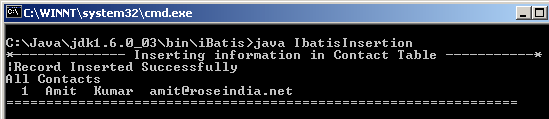
  4.  execute IbatisInsertion class file and output on your command prompt will be flashed as
    "Record Inserted Successfully"

Output:
Download Source Codes


» View all related tutorials
Related Tags: c database query com ide ant data properties import object mapping map sed maps vi port bat id app tab

Leave your comment:

Name:

Email:

URL:

Title:

Comments:


Enter Code:

Audio Version
Reload Image
 

Note: Emails will not be visible or used in any way, and are not required. Please keep comments relevant. Any content deemed inappropriate or offensive may be edited and/or deleted.

No HTML code is allowed. Line breaks will be converted automatically. URLs will be auto-linked. Please use BBCode to format your text.

Add This Tutorial To:
  Del.icio.us   Digg   Google   Spurl   Blink   Furl   Simpy   Y! MyWeb 

Current Comments

1 comments so far (
post your own) View All Comments Latest 10 Comments:

Very easy to understand.
Than you very much.

Posted by Sakthi on Wednesday, 12.17.08 @ 22:59pm | #82901

Training Courses
Tell A Friend
Your Friend Name
Software Solutions
Least Viewed
Most Rated
Recently Viewed
Search Tutorials


Home | JSP | EJB | JDBC | Java Servlets | WAP  | Free JSP Hosting  | Search Engine | News Archive | Jboss 3.0 tutorial | Free Linux CD's | Forum | Blogs

About Us | Advertising On RoseIndia.net  | Site Map

India News

Indian Software Development Company | iPhone Development Company in India | Flex Development Company in India | Java Training Delhi | Java Training at Noida |

Send your comments, Suggestions or Queries regarding this site at roseindia_net@yahoo.com.

Copyright © 2008. All rights reserved.