
Struts 2 Validation (Int Validator)


Struts 2 Framework provides in-built validation functions to validate user inputs. These validation functions are sufficient for any normal web application. In some cases these standard set of validation functions are not sufficient to validate complex business logic. To validate complex business logic, Struts 2 validation framework can be extended to develop custom validation functions.
This section discusses all the validation functions available with Struts 2 framework. Subsequent sections of the tutorials discuss these validation functions with examples.
Validation Rules
Validation rules are an integral part of Struts 2 applications, where rules to validating particular user inputs are stored. Struts 2 validation framework validates user input against the defined rules.
The validation rules can be specified:
- Per Action class: ActionName-validation.xml
- Per Action alias: ActionName-alias-validation.xml
- Inheritance hierarchy and interfaces are implemented by Action class. The XWork searches up the inheritance tree of the action to find default validations for parent classes of the action and interfaces implemented.
- Using Java 5 annotations.
Struts 2 default validation functions
Following field validators are part of Struts 2 framework:
- Conversion Validator
- Date Validator
- Double Validator
- Email Validator
- Expression Validator
- Feldexpression Validator
- Int Validator
- Regex Validator
- Required Validator
- Requiredstring Validator
- Stringlength Validator
- URL Validator
- Visitor Validator
Using Struts 2 Int Validator
Following example discusses the use of Int Validator to validate integer input by user. Here are the steps to develop Int validator example:
Step 1: Create the xml file and adds the following xml snippet in the struts.xml file.
struts.xml
|
<?xml version="1.0" encoding="UTF-8" ?> <!DOCTYPE struts PUBLIC "-//Apache Software Foundation//DTD Struts Configuration 2.0//EN" "http://struts.apache.org/dtds/struts-2.0.dtd"> <struts> <!-- Rose India Struts 2 Tutorials --> <constant name="struts.enable.DynamicMethodInvocation" value="false" /> <constant name="struts.devMode" value="true" /> <package name="roseindia" namespace="/roseindia" extends="struts-default"> <!-- Add actions here --> <!-- int validation --> <action name="intValidation" class="net.roseindia.NumAction"> <result name="input">/pages/intInputForm.jsp</result> <result name="error">/pages/intInputForm.jsp</result> <result>/pages/intSuccess.jsp</result> </action> <!-- Add actions here --> </package> <!-- Add packages here --> </struts> |
Step 2 : Create the input form.
intInputForm.jsp
<%@ taglib prefix="s" uri="/struts-tags" %>
|
Step 3 : Create the Action class.
NumAction.java
package net.roseindia;
|
Step 4 : Create the validations.
The validation.xml format is either <ActionClassName>-validation.xml or <ActionClassName>-<ActionAliasName>-validation.xml.
Write validation rule
The following validation rule file defines the rules to check the input range. The int Field Validator checks whether the given integer is within a certain range or not. If an integer is within a certain range then you jumped into the intSuccess.jsp page. Otherwise it displays the given message in the xml file (Number needs in between 10 and 80). The int validator takes the following parameters:
- fieldName - The field name which is to be validated. Required if using Plain-Validator Syntax otherwise not required
- min - This is the minimum value (if none is specified, it will not be checked).
- max - This is the maximum value (if none is specified, it will not be checked).
NumAction-validation.xml
<?xml version="1.0" encoding="UTF-8"?>
|
When the given number is within 10 and 80 then the intSuccess.jsp page displays the inputted number with "Correct Input Number" message.
intSuccess.jsp
<%@page language="java" %>
|
Output:
When this application executes you get the following:
 |
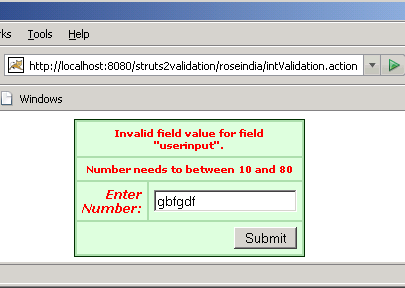
If you enter the wrong data or text then you get:
 |
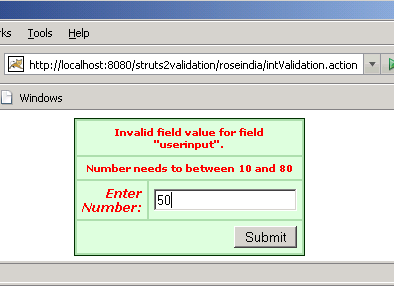
When you fill a number '50'
 |
Then you get:
 |