
Struts 2 double validator


The Double validator of Struts 2 Framework checks if the given input is double or not. If the input is not double, it generates the error message. Double validator can also be used to check the input range. This example is a demonstration to use double validator check the input range.
Follow the steps to develop double range validator example:
Step 1: Create the struts.xml file and add the following xml snippet in the struts.xml file.
struts.xml
<?xml version="1.0" encoding="UTF-8" ?><!DOCTYPE struts PUBLIC
"-//Apache Software Foundation//DTD Struts Configuration 2.0//EN"
"http://struts.apache.org/dtds/struts-2.0.dtd">
<struts>
<!-- Rose India Struts 2 Tutorials -->
<constant name="struts.enable.DynamicMethodInvocation" value="false" />
<constant name="struts.devMode" value="true" />
<package name="roseindia" namespace="/roseindia" extends="struts-default">
<!-- Add actions here -->
<!-- double validation -->
<action name="doubleValidation" class="net.roseindia.DoubleVaLidationAction">
<result name="input">/pages/doubleInputForm.jsp</result>
<result name="error">/pages/doubleInputForm.jsp</result>
<result>/pages/doubleSuccess.jsp</result>
</action>
<!-- Add actions here -->
</package>
<!-- Add packages here -->
</struts>
Step 2 : Create the input form.
doubleInputForm.jsp
<%@ taglib prefix="s" uri="/struts-tags" %>
<html>
<head>
<title>Input form</title>
<link href="<s:url value="/css/main.css"/>" rel="stylesheet"
type="text/css"/>
<s:head/>
</head>
<body>
<s:form method="POST" action="doubleValidation">
</td>
</tr>
<s:textfield label="Enter Total Percentage Marks" name="percentagemarks" maxlength="10" />
<s:submit />
</s:form>
</body>
</html>
Step 3 : Create the Action class.
DoubleVaLidationAction.java
package net.roseindia;
import com.opensymphony.xwork2.ActionSupport;

public class DoubleVaLidationAction extends ActionSupport{

  private double percentagemarks;

  public String execute() throws Exception{
       return SUCCESS;
  /*/*if (getPercentagemarks() > 20.1 && getPercentagemarks() < 50.1){
      return SUCCESS;
    }
    else{
      return ERROR;
    }
*/
  }

  public void setPercentagemarks(double percentagemarks){
    this.percentagemarks = percentagemarks;
  }
  public double getPercentagemarks(){
    return percentagemarks;
  }
}
Step 4 : Create the validators.
The validation.xml format is either <ActionClassName>-validation.xml or <ActionClassName>-<ActionAliasName>-validation.xml.
Double validator: This Field Validator checks, if the given number is double and specified within the specified range. If your inputted text is valid or within specified range then you jump into the doubleSuccess.jsp page. Otherwise, it displays the given message in the xml file (Percentage marks need to between 20.1 and 50.1). The double validator takes the following parameters:
- fieldName - This is the field name of validator that have to validate. Required if using int-Validator Syntax otherwise not required
- minInclusive - This is the minimum inclusive value as FloatValue format specified by Java language (if none is specified, it will be checked)
- maxInclusive - This is the maximum inclusive value as FloatValue format specified by Java language (if none is specified, it will be checked)
- minExclusive - This is the minimum exclusive value as FloatValue format specified by Java language (if none is specified, it will be checked)
- maxExclusive - This is the maximum exclusive value as FloatValue format specified by Java language (if none is specified, it will be checked)
DoubleVaLidationAction-validation.xml
<?xml version="1.0" encoding="UTF-8"?>
<!DOCTYPE validators PUBLIC
  "-//OpenSymphony Group//XWork Validator 1.0.2//EN"
  "http://www.opensymphony.com/xwork/xwork-validator-1.0.2.dtd">

<validators>

  <field name="percentagemarks">
  <field-validator type="double">
  <param name="minInclusive">20.1</param>
  <param name="maxInclusive">50.1</param>
  <message>Percentage marks need to between
${minInclusive} and ${maxInclusive}</message>
  </field-validator>
  </field>

</validators>
When any double value is within specified range then you must jump into doubleSuccess.jsp page and it displays your inputted double value with "Aggregate Total Marks: "message.
stringSuccess.jsp
<%@page language="java" %>
<html>

<head>
  <title>Correct entry</title>
</head>

<body>
<b>Aggregate Total Marks: </b><%=request.getParameter("percentagemarks") %>%
</body>

</html>
Output:
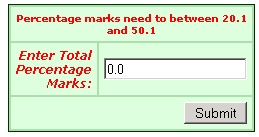
When this application executes, you get the following:
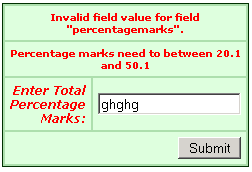
If you enter the wrong data or text then you get:
When you fill a number '26.105'
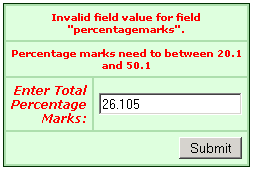
Then you get:
