Core Java| JSP| Servlets| XML| EJB| JEE5| Web Services| J2ME| Glossary| Questions?


Search Tutorials

Latest Questions
Comments
 
Accessing Database from servlets through JDBC! 
 

Accessing Database from servlets through JDBC! Accessing Access Database From Servlet T his article shows you how to access database from servlets. Here I am assuming that you are using win95/98/2000 and running Java Web Server. For the sake of


Accessing Access Database From Servlet


This article shows you how to access database from servlets. Here I am assuming that you are using win95/98/2000 and running Java Web Server. For the sake of simplicity I have used Microsoft Access Database as backend and Sun's JDBC-ODBC bridge to connect to access data source. First of all download the source code and database used in this tutorial and now follow the following the steps.

  1. Unzip the downloaded file into your favorite directory.
  2. Create an ODBC data source "emaildb" by selecting "emaildb.mdb" database from unzipped folder.
  3. Compile you emaildb.java file, move emaildb.class file to Java Web Servers servlets directory and register the servlet. Now open your browser and run the servlet.

Your browser should display the data from database.
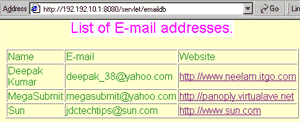
Now we will examine how the code  works.

import java.io.*;
import java.util.Enumeration;
import javax.servlet.*;
import javax.servlet.http.*;
import java.sql.*;
import java.net.*;

public class emaildb extends HttpServlet{
     Connection theConnection;
     private ServletConfig config;

public void init(ServletConfig config)
  throws ServletException{
     this.config=config;
   }

public void service (HttpServletRequest req, HttpServletResponse res)
throws ServletException, IOException {

   HttpSession session = req.getSession(true);

   res.setContentType("text/html");

   PrintWriter out = res.getWriter();

   out.println("<HTML><HEAD><TITLE>Emai List.</TITLE>");

   out.println("</HEAD>");

   out.println("<BODY bgColor=blanchedalmond text=#008000 topMargin=0>");

   out.println("<P align=center><FONT face=Helvetica><FONT color=fuchsia style=\"BACKGROUND-COLOR: white\"><BIG><BIG>List of E-mail addresses.</BIG></BIG></FONT></P>");

    out.println("<P align=center>");

out.println("<TABLE align=center border=1 cellPadding=1 cellSpacing=1 width=\"75%\">");


    out.println("<TR>");

    out.println("<TD>Name</TD>");

    out.println("<TD>E-mail</TD>");

    out.println("<TD>Website</TD></TR>");

try{


     //Loading Sun's JDBC ODBC Driver   
     Class.forName("sun.jdbc.odbc.JdbcOdbcDriver");
     

   //Connect to emaildb Data source
   theConnection = DriverManager.getConnection("jdbc:odbc:emaildb", "admin", "");
   

   Statement theStatement=theConnection.createStatement();

   ResultSet theResult=theStatement.executeQuery("select * from emaillists"); //Select all records from emaillists table.

  //Fetch all the records and print in table
    while(theResult.next()){

   out.println();

   out.println("<TR>");

   out.println("<TD>" + theResult.getString(1) + "</TD>");

   out.println("<TD>" + theResult.getString(2) + "</TD>");

   String s=theResult.getString(3);

   out.println("<TD><a href=" + s + ">" + s + "</a></TD>");

   out.println("</TR>");

    }

  theResult.close();//Close the result set

  theStatement.close();//Close statement

  theConnection.close(); //Close database Connection

  }catch(Exception e){

   out.println(e.getMessage());//Print trapped error.

  }

  out.println("</TABLE></P>");

  out.println("<P>&nbsp;</P></FONT></BODY></HTML>");

 }

  public void destroy(){

  }

}


Here we have used Sun's JDBC-ODBC  Bridge, but we can easily replace the driver in order to connect the servlet to another database. For example, we can use the following code to connect our program to MySQL database.

Class.forName("org.gjt.mm.mysql.Driver");

    theConnection = DriverManager.getConnection("jdbc:mysql://192.192.10.1:3306/mysql", "mysql","mysql");

JDBC driver for MySQL is available at www.mysql.com and is free. Here I have assumed that your mysql server is running at port 3306 of computer, whose IP address is 192.192.10.1.


» View all related tutorials
Related Tags: java sql mysql c database api ide jdbc data batch application io get vi exec state int bat this id

Leave your comment:

Name:

Email:

URL:

Title:

Comments:


Enter Code:

Audio Version
Reload Image
 

Note: Emails will not be visible or used in any way, and are not required. Please keep comments relevant. Any content deemed inappropriate or offensive may be edited and/or deleted.

No HTML code is allowed. Line breaks will be converted automatically. URLs will be auto-linked. Please use BBCode to format your text.

Add This Tutorial To:
  Del.icio.us   Digg   Google   Spurl   Blink   Furl   Simpy   Y! MyWeb 

Current Comments

2 comments so far (
post your own) View All Comments Latest 10 Comments:

Hi. I am building a simple web application using struts.
I have two tables in my oracle database by the names user_details having usernames and passwords and the to_do_list having serial no., task, due date and status of the number of task to be done.
I need to create a new task in database, edit the existing tasks and delete the desired tasks from my dynamic web project.
I am facing problems in passing the details of selected tasks from a jsp to the corresponding servlets for creating, editing or deleting the records

Posted by Shashank on Sunday, 12.21.08 @ 05:36am | #83010

sir,
will u please mail me how change from type1 driver to type4 driver in oracle 10g without changing my code

Posted by Ashu on Monday, 07.7.08 @ 03:55am | #66043

Training Courses
Tell A Friend
Your Friend Name
Software Solutions
Least Viewed
Most Rated
Recently Viewed
Search Tutorials


Home | JSP | EJB | JDBC | Java Servlets | WAP  | Free JSP Hosting  | Search Engine | News Archive | Jboss 3.0 tutorial | Free Linux CD's | Forum | Blogs

About Us | Advertising On RoseIndia.net  | Site Map

India News

Indian Software Development Company | iPhone Development Company in India | Flex Development Company in India | Java Training Delhi | Java Training at Noida |

Send your comments, Suggestions or Queries regarding this site at roseindia_net@yahoo.com.

Copyright © 2008. All rights reserved.