Create table and insert data by sql query


This is detailed java program to connect java application and execute sql query like create table in mysql database, insert some values and retrieve values from the table.
Before running this java code you need mysql-connector-java-3.1.6-bin.jar file in the jdk1.6.0_01\lib and set class path to this file.
ExecuteSqlQuery.java
 /**
 * Execute sql queries with java application.
 */
import java.sql.*;
class ExecuteSqlQuery {
 public static void main(String[] args) {
  try {
  /* Create string of connection url within specified
format with machine name, port number and database
name. Here machine name id localhost and database
 name is usermaster. */
  String connectionURL = "jdbc:mysql://localhost:3306/usermaster";
  // declare a connection by using Connection interface
  Connection connection = null;
  // declare object of Statement interface that uses for executing
 sql statements.
  Statement statement = null;
  // declare a resultset that uses as a table for output data from
tha table.
  ResultSet rs = null;
  int updateQuery = 0;
  // Load JDBC driver "com.mysql.jdbc.Driver".
  Class.forName("com.mysql.jdbc.Driver").newInstance();
  /* Create a connection by using getConnection() method that takes
 parameters of string type connection url, user name and password
to connect to database. */
  connection = DriverManager.getConnection(connectionURL, "root", "root");

  /* createStatement() is used for create statement object that is
 used for sending sql statements to the specified database. */
  statement = connection.createStatement();
  // sql query of string type to create a data base.
  String QueryString = "CREATE TABLE user_master1(User_Id INTEGER NOT
 NULL AUTO_INCREMENT, " + "User_Name VARCHAR(25), UserId VARCHAR(20),
 User_Pwd VARCHAR(15), primary key(User_Id))";
  updateQuery = statement.executeUpdate(QueryString);
  // sql query to insert values in the specified table.
  QueryString = "INSERT INTO user_master1(User_Name,UserId,User_Pwd)
 VALUES ('Mahendra',"+ "'mahendra25','1213456')";
  updateQuery = statement.executeUpdate(QueryString);
  if (updateQuery != 0) {
  System.out.println("table is created successfully and " + updateQuery
 + " row is inserted.");
  }
  // sql query to retrieve values from the specified table.
  QueryString = "SELECT * from user_master1";
  rs = statement.executeQuery(QueryString);
  while (rs.next()) {
 System.out.println(rs.getInt(1) + " " + rs.getString(2) + "  "
+ rs.getString(3) + "  "+rs.getString(4)+"\n");
 }
 // close all the connections.
  rs.close();
  statement.close();
  connection.close();
  }
   catch (Exception ex) {
  System.out.println("Unable to connect to batabase.");
  }
  }
}
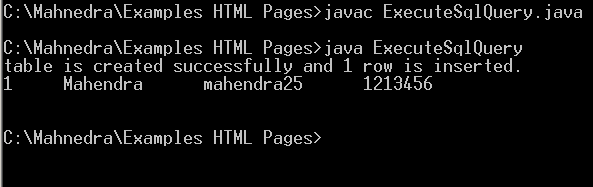
Output of the program