
A URL (Uniform Resource Locator) is the address of a resource on the Internet.
URL in term of Java Network Programming


A
URL (Uniform Resource Locator) is the address of a resource on the Internet. In
java network programming we can use URLs to connect and retrieve information
over the Internet. In this section we will provide the complete information
about the way of using URL in java network programming through a full
code-example. The example give you the full exposure to network programming e.g.
how to open a connection to a URL, how to retrieve information of a given URL.
Now
here we are provide a simple name structure of a URL which addresses the Java
Web site hosted by roseindia:

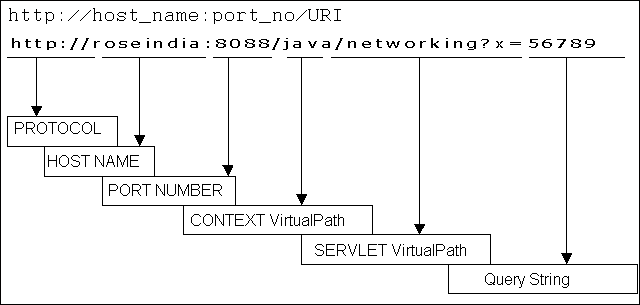
In the above given URL structure there are two main components:
- Protocol identifier
- Resource name
In which there is a colon and two forward
slashes between protocol identifier and the resource name. The protocol
identifier is the name of the protocol which is used in the URL structure to get
the resource. Here we use the http which is one of the protocols used to access
different types of resources on the net. HTTP is mainly used to serve
the hypertext documents.
The
second part of the URL is resource name that is the complete address of the
resource. The resource name contains one or more of the components listed in the
following table :-
|
Host
Name |
The name of the
machine on which the resource lives. |
|
Filename
|
The pathname to the
file on the machine. |
|
Port
Number |
The port number to
which to connect (typically optional). |
|
Reference
|
A reference to a named
anchor within a resource that usually identifies a specific location
within a file (typically optional). |
In
the above given table of the URL structure, for many protocols the host name and
the filename are required but in some times the port number and reference are
optional.