
Login Screen of Application


Login Screen our web application allows the user, the registered user, to logon to the system. User is authenticated against the data stored in the database and once the authentication is successful user is allowed to logged on the system.
Login Screen:
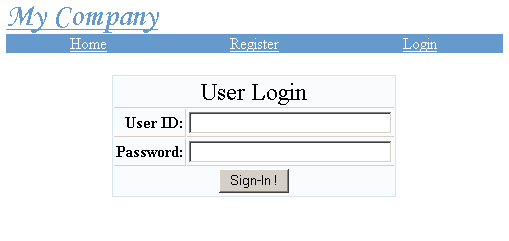
Field Description:
Login Id and Password : The login window contains two fields to enter User Id and Password. Registered user can login to the system with the personal User Id and Password that s/he had chosen while registering. If one forgets the Login Id or Password then s/he has to again go through the registration process by selecting a new Login Id and Password or contact the admin to get the password. This application can be improved by just adding a new email password form to the application. You can easily add the new email password form by creating a new action form, action class, DAO code and necessary emailing code.
Once the login is successful following form is displayed:

Now user can Update His/Her profile.