Databases| SQL| MySQL| Questions?


Search Tutorials:
 

Software Solutions and Services


  JDO Tutorials
  EAI Articles
  Struts Tutorials
  Java Tutorials
  Java Certification
  Java Applet
Questions
Comments
 
Use of Select Box to show the data from database 
 

This example will describe you the use of Select Box in a JSP page to show the data fetched from the database.


Use of Select Box to show the data from database


Example program using Select Box to show retrieved data from database

This example will describe you the use of Select Box in a JSP page to show the data fetched from the database. We are using Servlet to get data from the database using MySQL and we are forwarding this servlet data to the "selectbox.jsp" page using "RequestDispatcher". In this page, item selected in the select box is shown in the text box correspondingly.

In this example we are using JavaScript to show the content selected in the select box and correspondingly reflect it to the text box. We are using a function "change()" to get the values selected by user from Select Box.

<script type="text/javascript">
function change()
{
var answer = document.getElementById('selc').value;
document.getElementById('textvalue').value=answer;
}

</script>

For getting values from database we are using MySQL database and connecting to the database "messagepaging" . Table structure for "message" table is given as below :

create table `message` (
`id` double ,
`message` varchar (256)
); 
insert into `message` (`id`, `message`) values('1','amir');
insert into `message` (`id`, `message`) values('2','raghuwanshi');
insert into `message` (`id`, `message`) values('3','raghuw');
insert into `message` (`id`, `message`) values('4','suman');
insert into `message` (`id`, `message`) values('5','amit');

In DataServlet we are getting data from the "message" table and adding to a List object  to dispatch it to the JSP page's select box. Following lines of code is written to send data to JSP page by setting attribute 

request.setAttribute("data",dataList);

This request is dispatched to JSP page in following way

RequestDispatcher dispatcher = request.getRequestDispatcher(page);
if (dispatcher != null){
dispatcher.forward(request, response);

where page is defined in a string object

String page="selectbox.jsp";

Full code for Servlet File "DataServlet.java" is given as below:

1. DataServlet.java

import java.io.*;
import java.util.*;
import java.sql.*;
import javax.servlet.*;
import javax.servlet.http.*;

public class DataServlet extends HttpServlet{

  private ServletConfig config;
  //Setting JSP page
  String page="selectbox.jsp";

  public void init(ServletConfig config)
    throws ServletException{
     this.config=config;
     }
  public void doGet(HttpServletRequest request, HttpServletResponse response
              throws 
ServletException, IOException {
    
    PrintWriter out = response.getWriter();
    //Establish connection to MySQL database
    String connectionURL = "jdbc:mysql://192.168.10.59/messagepaging";
    Connection connection=null;
    ResultSet rs;
    response.setContentType("text/html");
    List dataList=new ArrayList()
      try {
       // Load the database driver
      Class.forName("com.mysql.jdbc.Driver");
      // Get a Connection to the database
      connection = DriverManager.getConnection(connectionURL, "root""root")
      //Select the data from the database
      String sql = "select message from message";
      Statement s = connection.createStatement();
      s.executeQuery (sql);
      rs = s.getResultSet();
      while (rs.next ()){
        //Add records into data list
        dataList.add(rs.getString("message"));
      }
      rs.close ();
      s.close ();
      }catch(Exception e){
      System.out.println("Exception is ;"+e);
      }
      request.setAttribute("data",dataList);
      //Disptching request
      RequestDispatcher dispatcher = request.getRequestDispatcher(page);
      if (dispatcher != null){
        dispatcher.forward(request, response);
      
  }
}

JSP page "selectbox.jsp" is getting data in following way 

<% List data= (List) request.getAttribute("data");

Full code of JSP page is given as below:

2. selectbox.jsp

<%@ page language="java" import="java.util.*"%>
<html>
<head>
<script type="text/javascript">
function change()
{
var answer = document.getElementById('selc').value;
document.getElementById('textvalue').value=answer;
}
</script>
</head>
<body>
<h1>Use of Select Box in JSP</h1>
<table border="1" width="41%" height="53" cellspacing="0" cellpadding="3" 
                                          bgcolor="#000080" bordercolorlight="#FFFFFF">
<tr>
<td width="100%" height="18" colspan="2"><b>
<font color="#FF00FF">Select items from select box</font></b></td>
</tr>
<tr>
<td width="17%" height="23">
<select name="ActionSelect" onChange="change()" id="selc" >
<%Iterator itr;%>
<% List data= (List)request.getAttribute("data");
for (itr=data.iterator(); itr.hasNext(); )
{
String value=(String)itr.next();
%>
<option value=<%=value%>><%=value%></option>
<%}%> 
</select>
</td>
<td width="83%" height="23"><input type="text" id="textvalue" />
</td>
</tr>
</table>
</body>
</html>

For servlet to run and execute we have to do servlet entry into "web.xml

<?xml version="1.0" encoding="ISO-8859-1"?>

    <web-app>
     <display-name>Welcome to Tomcat</display-name>
     <description>Welcome to Tomcat</description>
     <servlet>
             <servlet-name>DataServlet</servlet-name>
              <servlet-class>DataServlet</servlet-class>
     </servlet>
     <servlet-mapping>
              <servlet-name>DataServlet</servlet-name>
              <url-pattern>/DataServlet</url-pattern>
     </servlet-mapping>
   </web-app>

Steps required to run this example:

  • Create database and table "message"
  • Create and Save "DataServlet"
  • Compile and place this class file into Web-Inf/classes folder
  • Do entry of servlet into web.xml
  • Create and Save JSP file selectbox.jsp
  • Start and deploy Tomcat Server and type the following URL in address bar
    http://localhost:8080/Jspexample/DataServlet

Output:

First value selected by default is  data list's first item.

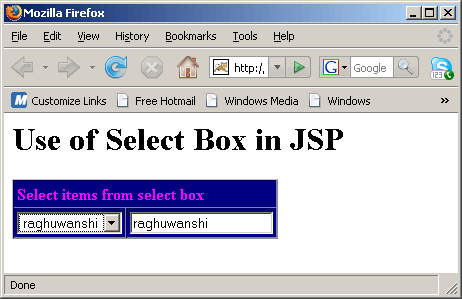
When we select any other item from select box then it will reflect to the text box as well.
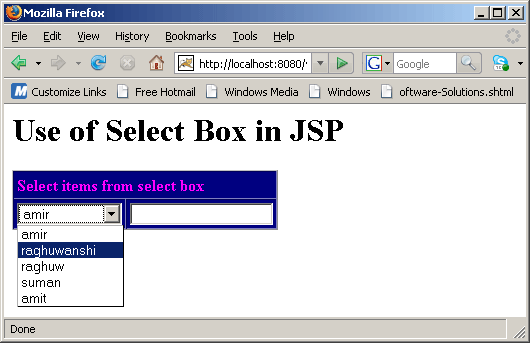
value "raghuwanshi" selected and then it is reflected in text box
Download Source Code


» View all related tutorials
Related Tags: c database design com ide data software io get install this id secure war tab work databases to base ast

Leave your comment:

Name:

Email:

URL:

Title:

Comments:


Enter Code:

Audio Version
Reload Image
 

Note: Emails will not be visible or used in any way, and are not required. Please keep comments relevant. Any content deemed inappropriate or offensive may be edited and/or deleted.

No HTML code is allowed. Line breaks will be converted automatically. URLs will be auto-linked. Please use BBCode to format your text.

Add This Tutorial To:
  Del.icio.us   Digg   Google   Spurl   Blink   Furl   Simpy   Y! MyWeb 
Training Courses
Tell A Friend
Your Friend Name
Website Designing Services
 
Web Designing Packages From $150!
 
Website Designing Company Web Hosting
 
Website Designing Quotation
 
Search Tutorials:


Home | JSP | EJB | JDBC | Java Servlets | WAP  | Free JSP Hosting  | Search Engine | News Archive | Jboss 3.0 tutorial | Free Linux CD's | Forum | Blogs

About Us | Advertising On RoseIndia.net  | Site Map

India News

Indian Software Development Company | iPhone Development Company in India | Flex Development Company in India | Java Training Delhi | Java Training at Noida |

Send your comments, Suggestions or Queries regarding this site at roseindia_net@yahoo.com.

Copyright © 2008. All rights reserved.