Using MYSQL Database with JSP & Servlets.


MYSQL is a powerful RDBMS, which can
handle large amount of data. And more interestingly it is free to use,
except for some commercial use. you can download it from www.mysql.com.
It is available for both Linux and NT platforms, but it is primarily
for Linux and Unix servers and is mostly used on Linux and Unix
platform.
This lesson is intended to provide hands an experience with MYSQL database. We will use tomcat web server to run over web application which acceres the MYSQL database. Here I am using MYSQL & tomcat server both running an Linux machine.
Downloading and installing MYSQL Server.
Downloading MYSQL server from www.mysql.com. Upload the downloaded file on to your Linux server. go to the directory where you uploaded the file. To install the file issue the Following command.rpm-ivh mysql-server-3.23.361.1386.rpm.
This will install the MySQL server on your
Linux machine.
Testing the installation is
complete.
Issue the following command after
the installation is complete.
MYSQL
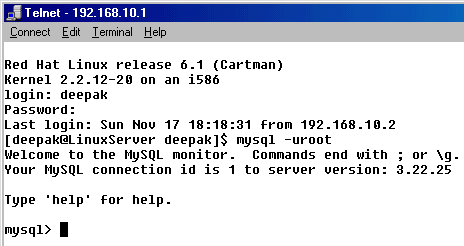
Syntax is:
mysql -h hostname -u
username -p[password]
Or
mysql
-h hostname -u username --password=password
Typing help on the mysql prompt shows online help.
mysql> help
MySQL commands:
help (\h) Display this text
? (\h)
Synonym for `help'
clear (\c) Clear command
connect (\r) Reconnect to the server. Optional arguments are db and host
edit (\e)
Edit command with $EDITOR
exit (\q)
Exit mysql. Same as quit
go (\g)
Send command to mysql server
ego (\G) Send command to mysql server; Display result vertically
print (\p) Print current command
quit (\q) Quit mysql
rehash (\#) Rebuild completion hash
status (\s) Get status information from the server
use (\u) Use another database. Takes database name as argument
Connection id: 1 (Can be used with mysqladmin kill)
mysql>
Creating a Database.
Now we create a database named "mysqltutorial" for our tutorial. create database is used to create database. Issue the following command to create mysqltutorial database.
mysql> create database mysqltutorial;
Query OK, 1 row affected (0.18 sec)
mysql>
After creating database it is required to connect to the database to create tables for our tutorial. To connect to a database "use <database name>" command is used. Type the following command to connect to mysqltutorial database.
mysql> use mysqltutorial;
Database changed
mysql>
In MySQL all the database commands are followed by a semi-colon(;).
Now we will create a table in the database 'test' for storing the names of countries. "Create table <table name>" command is used to create the table. Issue the following command on mysql promopt:
mysql> create table test(srno int, countryname char(50));
Query OK, 0 rows affected (0.29 sec)
mysql>
In the above example we have created a table named "test" to store country name, but the name "test" is not good. So we will change the name of table to "country". We will use "rename" command to rename the table. Type the following command to rename the table:
mysql> alter table test RENAME countryname;
Query OK, 0 rows affected (0.04 sec)
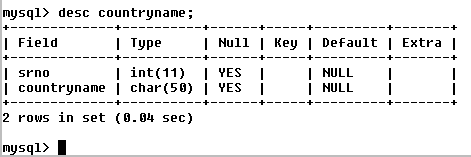
To view structure of database "desc
<table name>" is used. To view structure of countryname
issue the following command:
mysql> desc countryname;
Above command renames the table. To insert some records in the database insert into table (fields..) values (values..) command is used. Issue the following command to enter the country name in the database.
mysql> insert into countryname(srno,countryname) values(1,'India');
Query OK, 1 row affected (0.09 sec)
mysql>
mysql> insert into
countryname(srno,countryname) values(2,'USA');
Query OK, 1 row affected (0.09 sec)
mysql>
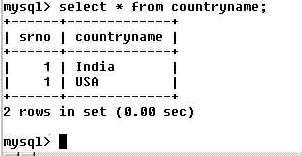
Above command enters a record in the countryname table. To view records from the countryname table issue the following command:
mysql> select * from countryname;
 0
0
In this section you learned how to work with MySQL database server, create database, create tables in database, rename table and insert and select the records from database table. In the next lesson we will learn how to connect to the database from JSP page.
Send you queries/suggestions regarding this tutorial to Deepak Kumar.