--Ads--
Update Database Table using JDBC in JSP


This example shows how to update the existing record of mysql table
using jdbc connectivity in the jsp page. In this example we have created
two jsp pages update.jsp and updatingDatabase.jsp. In the update.jsp
page, we are using a Text box where user can give his/her name and submit the
page. After submitting the page, updatingDatabase.jsp will be
called and the sql query ("update servlet set name = ? where id =
?") is executed which will modify the table record.
<%@page language="java" session="true"

  contentType="text/html;charset=ISO-8859-1"  %>

<font color="blue">Please Enter Your Name </font><br><br>

<form name="frm" method="post" action="updatingDatabase.jsp">

<table border = "0">

  <tr align="left" valign="top">

  <td>Name:</td>

  <td><input type="text" name ="name" /></td>

  </tr>

  <tr align="left" valign="top">

  <td></td>

  <td><input type="submit" name="submit" value="submit"/></td>

  </tr>

</table>

</form>
|
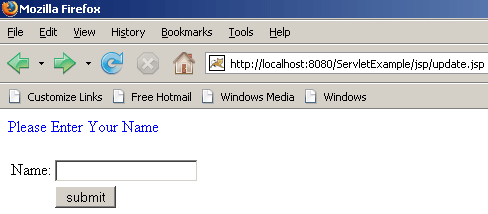
Type the url: http://localhost:8080/ServletExample/jsp/update.jsp
on your browser. Following output will be displayed:
updatingDatabase.jsp
<%@ page language = "java" contentType =

  "text/html; charset = ISO-8859-1"

  import =
"java.io.*"

  import =
"java.sql.*"

  import =
"java.util.*"

  import =
"javax.sql.*"

  import = "java.sql.ResultSet"

  import = "java.sql.Statement"

  import = "java.sql.Connection"

  import = "java.sql.DriverManager"

  import = "java.sql.SQLException"

%>

<%

  Connection con = null;

  PreparedStatement ps = null;

  ResultSet rs = null;

  Statement stmt = null;

  String name = request.getParameter("name");

  Integer id = 5;

%>

<html>

<head>

  <title>Updating Database</title>

</head>

<body>

<%

  try {

  Class.forName("com.mysql.jdbc.Driver");

  con =DriverManager.getConnection

  ("jdbc:mysql://192.168.10.59:3306/example",

  "root", "root");

  ps = con.prepareStatement("update servlet set

  name = ? where id = ?");

  ps.setInt(2, id);

  ps.setString(1, name);

  ps.executeUpdate();

  %>

  Database successfully Updated!<br>

  <%

  if(ps.executeUpdate()>=1){

  stmt=con.createStatement();

  rs = stmt.executeQuery("SELECT * FROM servlet");

  while(rs.next()){

  %>

  <%=rs.getObject(1).toString()%>

  <%=("\t\t\t")%>

  <%=rs.getObject(2).toString()%>

  <%=("<br>")%>

  <%

  }

  }


  } catch (IOException e) {

  throw new IOException("Can not display records.", e);

  } catch (ClassNotFoundException e) {

  throw new SQLException("JDBC Driver not found.", e);

  } finally {

  try {

  if(stmt != null){

  stmt.close();

  stmt = null;

  }

  if(ps != null) {

  ps.close();

  ps = null;

  }

  if(con != null) {

  con.close();

  con = null;

  }

  } catch (SQLException e) {}

  }

%>

</body>

</html>
|
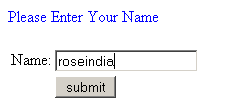
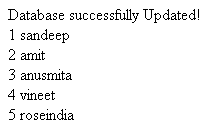
After submitting the name, it will be updated in the database and the records
will be displayed on your browser.
Download Source Code