create box in excel sheet using jsp


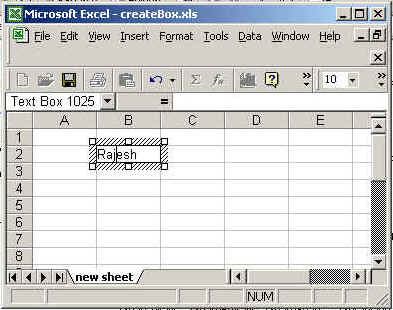
In this program we are going create a box and
then after we pass the sting in the box.
Code description
The package we need to import is java.io.*,java.util.* ,org.apache.poi.hssf.usermodel.HSSFSheet,
org.apache.poi.hssf.usermodel.
HSSFPrintSetup, org.apache.poi.hssf.usermodel.HSSFTextbox, org.apache.poi.hssf.usermodel.HSSFRichTextString,
org.apache.poi.hssf.usermodel.HSSFPatriarch,
org.apache.poi.hssf.usermodel.HSSFClientAnchor, org.apache. poi.hssf.usermodel.
HSSFSimpleShape and org.apache.poi.hssf.usermodel.
HSSFWorkbook.
The org.apache.poi.hssf.usermodel.HSSFRichTextString class extends
extends java.lang.Object and implements java.lang.Comparable.The
rich text unicode string and can have fonts applied to arbitary parts of the string.
There is a static short keyword NO_FONT is used that there is no font can
applied.
There are two constructor for HSSFRichTextString:
1.HSSFRichTextString()
2.HSSFRichTextString(java.lang.String string)
The org.apache.poi.hssf.usermodel.HSSFSimpleShape
class is extended by org.apache.poi.hssf.usermodel.HSSFTextbox
class and the org.apache.poi.hssf.usermodel.HSSFTextbox class is
extends HSSFSimpleShape.A textbox is a shape that may hold a rich text string.
createDrawingPatriarch():
This method is used to creates a top level drawing patriarch.
createTextbox(HSSFChildAnchor anchor):
This method is used to create a new textbox under the group.
In this example we are creating a sheet then after we create aobject of
patriarch after that we create textbox and at last we set string into created
box.
The code of the program is given below:
<%@ page import="org.apache.poi.hssf.usermodel.HSSFSheet"%>
|
The output of the program is given below: