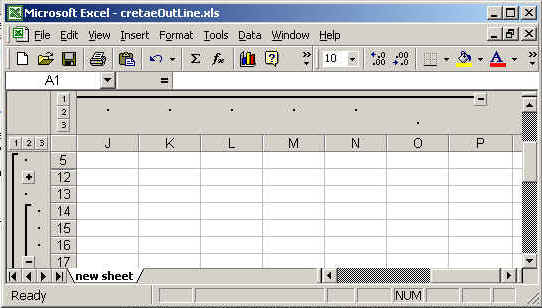
setting out line


In this program we are going to create a sheet then create
out line for rows and columns.
Code description
The package we need to import is java.io.*,java.util.* ,org.apache.poi.hssf.usermodel.HSSFSheet,
and org.apache.poi.hssf.usermodel. HSSFWorkbook.
The method used in this example shift row
grouprow( startIndex, endIndex):
This is used to create outline for rows startIndex and endIndex shows
the starting point and end points for the outline.
groupColumn(startIndex, endIndex):
This is used to create outline for column.
You can create the out line for both rows and columns. The out line is shown in
output between + and - linked with state line .
The code of the program is given below:
<%@ page import="org.apache.poi.hssf.usermodel.HSSFSheet"%>
|
The output of the program is given below: