Use of <fn:replace(String, String, String)> Tag of JSTL


In this section we will learn how to use <fn:replace>
Tag of JSTL. This tag returns a string after replacing the given sub string with
specified sub string. This takes string type as arguments and returns string
type.
| Syntax : |
java.lang.String replace(java.lang.String,
java.lang.String, java.lang.String) |
replace_fnJstlTag.jsp
<%@ taglib prefix="c" uri="http://java.sun.com/jsp/jstl/core" %>
<%@ taglib prefix="fn" uri="http://java.sun.com/jsp/jstl/functions" %>
<html>
    <head>
        <title>Example of fn:replace tag of Jstl tag library</title>
    </head>
    <body>
        <form method="POST">
            <table>
                <tr>
                    <td>Enter String in you want to replace</td>
                    <td><input type="text" name="string"></td>
                </tr>

                                <tr>
                    <td>Replace character/string</td>
                    <td><input type="text" name="find"></td>
                </tr>
                <tr>
                    <td>Replace with</td>
                    <td><input type="text" name="replaceWith" size="3"></td>
                </tr>

                                <tr>
                    <td></td>
                    <td><input type="submit" value="Replace all"></td>
                </tr>
            </table>
        </form>
        <c:if test="${pageContext.request.method=='POST'}">
            <c:set var="string" value="${param.string}"/>
            <c:set var="find" value="${param.find}"/>
            <c:set var="replaceWith" value="${param.replaceWith}"/>
            <font size="5" color="#1B2A0A">
                Result :
            </font>
            <font size="5" color="green">

   <c:out value="${fn:replace(string,find,replaceWith)}"/>

            </font>
        </c:if>
    </body>
</html>
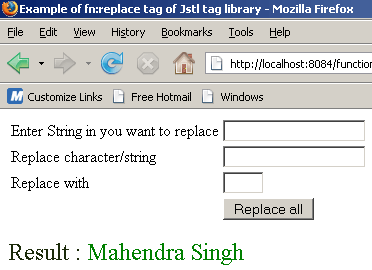
This jsp code shows the following output :

Suppose in user wants to replace all 'x' with character 'a' in string "Mahendra Singh"....

When user clicks on Replace all button, output will be.....