Record user login and logout timing In JSP


In this section, we have developed a web application of maintain record of the user Login and Logout Time in JSP. Six files are used "home.jsp","login.jsp", "userloginmid.jsp", "welcome.jsp","logout.jsp" and "userstatus.jsp" in the code given below.
Brief description of the flow of application :
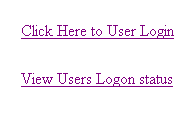
1). Create a webpage "home.jsp" to login the user and show the user login status link.
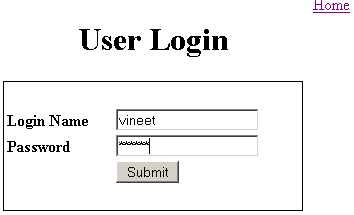
2). Create a webpage "login.jsp" to login the user.
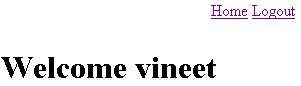
3). Create a webpage "welcome.jsp" to display a message after successful login.
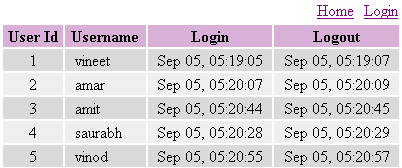
4). Create a webpage "userstatus.jsp" to display all the Login and Logout User status.
Step:1 Create Table for Database :
"userregister"
| create table `userregister` ( `id` double , `username` varchar (50), `password` varchar (50), `first_name` varchar (50), `last_name` varchar (50), `city` varchar (50), `state` varchar (50), `country` varchar (50) ); |
"admin"
| create table `admin` ( `id` double , `userid` double , `intime` datetime , `outtime` datetime ); |
Step:2 Create a web page "home.jsp" to login and display the user status link.
<HTML>
<HEAD>
<TITLE>Login Application</TITLE>
</HEAD>
<BODY>
<br><br><br><br><br>
<table align="center">
<%
if(session.getAttribute("username")!=null && session.getAttribute("username")!="")
{
%>
<tr><td align="left"><a href="logout.jsp">Click Here to Logout</a></td></tr>
<%
}
else
{
%>
<tr><td align="left"><a href="login.jsp">Click Here to User Login</a></td></tr>
<%
}
%>
<tr><td align="left"> </td></tr>
<tr><td align="left"><a href="userstatus.jsp">View Users Logon status</a></td></tr>
</table>
</BODY>
</HTML>
Step:3 To create a "login.jsp" to login the user
<html> <head> </head> <body> <br><br><br> <table align="center" width="400px" border=0> <tr><td align="right" width="300"><a href="home.jsp">Home</a></td></td></tr> </table> <table align="center"><tr><td colspan=2><h1>User Login</h2></td></tr></table> <form name="loginform" method="post" action="userloginmid.jsp"> <table align="center" width="300px" style="border:1px solid #000000;" > <tr><td colspan=2> </td></tr> <tr> <td><b>Login Name</b></td> <td><input type="text" name="userName" value=""></td> </tr> <tr> <td><b>Password</b></td> <td><input type="password" name="password" value=""></td> </tr> <tr> <td> </td> <td><input type="submit" name="Submit" value="Submit"></td> </tr> <tr><td colspan=2> </td></tr> </table> </form> </body> </html>
Step:4 To create a "welcome.jsp" to display the message
after succesful login the user.
<%@ page import="java.sql.*,java.util.*" %>
<html>
<body>
<br><br>
<table align="center" width="300px" border=0>
<%
String username="";
if(session.getAttribute("username")!=null && session.getAttribute("username")!="")
{
username=session.getAttribute("username").toString();
%>
<tr>
<td align="right" width="690"><a href="home.jsp">Home</a></td>
<td align="right"><a href="logout.jsp">Logout</a></td>
</tr>
<%
}
else
{
%>
<tr>
<td align="right"><a href="home.jsp">Home</a></td>
<td align="right"><a href="login.jsp">Login</a></td>
</tr>
<%
}
%>
<tr><td colspan=2> </td></tr>
<tr><td colspan=2><h1>Welcome <%=username%></h1></td></tr>
<table>
</body>
</html>
Step:5 Create a webpage "userstatus.jsp" to
display the User Status .
<%@ page import="java.sql.*,java.util.*,java.text.*,java.text.SimpleDateFormat" %>
<html>
<head>
<TITLE>Login Application</TITLE>
</head>
<body>
<br><br>
<table align="center" width="400px" border=0>
  <%
  if(session.getAttribute("username")!=null && session.getAttribute("username")!="")
  {
  %>
  <tr>
  <td align="right" width="350"><a href="home.jsp">Home</a></td>
  <td align="right"><a href="logout.jsp">Logout</a></td>
  </tr>
  <%
  }
  else
  {
  %>
  <tr>
  <td align="right" width="350"><a href="home.jsp">Home</a></td>
  <td align="right"><a href="login.jsp">Login</a></td>
  </tr>
  <%
  }
  %>
</table>
<table width="400px" align="center" border=0>
  <tr style="background-color:#D9B0D8;">
  <td align="center"><b>User Id</b></td>
  <td align="center"><b>Username</b></td>
  <td align="center"><b>Login</b></td>
  <td align="center"><b>Logout</b></td>
  </tr>
<%
System.out.println("MySQL Connect Example.");
Connection conn = null;
String url = "jdbc:mysql://localhost:3306/";
String dbName = "user_register";
String driver = "com.mysql.jdbc.Driver";
String username = "root";
String userPassword = "root";
String user = "";
try
{
  Class.forName(driver).newInstance();
  conn = DriverManager.getConnection(url+dbName,username,userPassword);
  Statement st = conn.createStatement();
  Statement st1 = conn.createStatement();
  String queryString = "select * from admin order by userid";
  ResultSet rs = st.executeQuery(queryString);
  ResultSet rs1=null;
  String queryStringuser="";
  SimpleDateFormat sdfDestination=null;
  int count=0;
  String strcolor = "";
  while(rs.next())
  {
  count = count%2;
  if(count==0)
  {
  strcolor = "#D9D9D9";
  }
  else
 {
  strcolor = "#EFEFEF";
  }
  count++;
  queryStringuser = "select * from userregister where id="+rs.getInt(2);
  rs1 = st1.executeQuery(queryStringuser);
  while(rs1.next())
  {
  user  = rs1.getString(2);
  }
 String inStr="";
  String outStr="";
  java.util.Date date;
  String intime="";
  String outtime="";
  if((rs.getString(3)!=null && rs.getString(3)!=""))
  {
  inStr = rs.getString(3).toString().substring(0,rs.getString(3).toString().indexOf("."));
  try
 {
 date = new  SimpleDateFormat("yyyy-MM-dd hh:mm:ss").parse(inStr);
  sdfDestination = new SimpleDateFormat("MMM dd, hh:mm:ss");
  intime = sdfDestination.format(date);
  }
  catch (Exception e)
  {
  e.getMessage();
  }
  }

  if((rs.getString(4)!=null && rs.getString(4)!=""))
  {
  outStr = rs.getString(4).toString().substring(0,rs.getString(3).toString().indexOf("."));
  try
  {
  date = new  SimpleDateFormat("yyyy-MM-dd hh:mm:ss").parse(outStr);
  sdfDestination = new SimpleDateFormat("MMM dd, hh:mm:ss");
  outtime = sdfDestination.format(date);
  }
  catch (Exception e)
  {
  e.getMessage();
  }
  }
  %>
  <tr style="background-color:<%=strcolor%>;">
   <td align="center"><%=rs.getInt(2)%></td>
   <td align="left" style="padding-left:10px;"><%=user%></td>
   <td align="center"><%=intime%></td><td align="center"><%=outtime%></td>
   </tr>
  <%
  }
  conn.close();
}
catch (Exception e)
{
  e.printStackTrace();
}
%>
Output:
Login Authentication form :
After Successful Login user :
Status of all the User