Home Jsp How to Open JSP?


How to Open JSP?
Posted on: November 1, 2008 at 12:00 AM
In this section you learn How to Open JSP in text editor. The JSP file is simple text file with HTML code embedded with Java Code. Since JSP is simple text file you can simply open it in notepad.

How to Open JSP?


In this section you learn How to Open JSP in text editor. The JSP file is simple text file with HTML code embedded with Java Code. Since JSP is simple text file you can simply open it in notepad.

On Linux system you can use any text editor such as vi or pico editor to open it.

Opening file in Edit plus

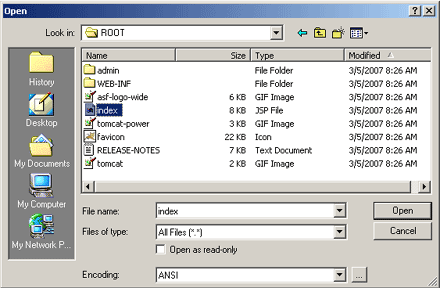
Edit plus is popular text editor among the programmers. Its very easy to use text editor. To open file in Edit plus select File --> Open from the menu bar and then browser the jsp file, select it and click on the "Open" button. 

After clicking on the "Open" button, the Edit plus editor will open the JSP file in the editor window. In the editor window you can easily edit the JSP file.
 

Other text editors to open the JSP file

Here are few editors that you can use to open the JSP files.

  • Taxtpad
  • HTML Kit


Related Tags for How to Open JSP?:
javahtmlcjspfiletexteditorembeddedioembedthisopensimplejsedittexwithtoedilearnearexteilitsectionnotnotepadcanpeimceddeinnomlmcaddjadempenhowpadtorsspplyinchtmisnotempleaarcodcodesimxtvassthavpleplodeono


More Tutorials from this section

Ask Questions?    Discuss: How to Open JSP?  

Post your Comment


Your Name (*) :
Your Email :
Subject (*):
Your Comment (*):
  Reload Image


Ask Questions?

If you are facing any programming issue, such as compilation errors or not able to find the code you are looking for.

Ask your questions, our development team will try to give answers to your questions.