
Home | Ajax | BioInformatics | Dojo | EAI | EJB | Hibernate | J2ME | Java | Java Glossary | Java Servlets | JavaScript | Jboss | JDBC | JDO | Jmeter | JSF | JSP | JUnit | Maven | MySQL | Spring Framework | SQL | Struts | Technology | WAP | Web Services | XML
 
 
Search All Tutorials

 
Programming Tutorials: Ajax | Articles | JSP | Bioinformatics | Database | Free Books | Hibernate | J2EE | J2ME | Java | JavaScript | JDBC | JMS | Linux | MS Technology | PHP | RMI | Web-Services | Servlets | Struts | UML
 
Java
  JDO Tutorials
  EAI Articles
  Struts Tutorials
  Java Tutorials
  Java Certification
  Java Applet
Questions
Comments

Thread Creation


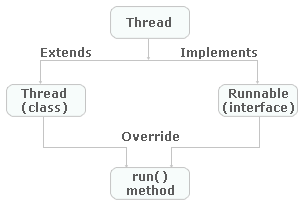
In Java, an object of the Thread class can represent a thread. Thread can be implemented through any one of two ways:

  • Extending the java.lang.Thread Class
  • Implementing the java.lang.Runnable Interface
I. Extending the java.lang.Thread Class

For creating a thread a class have to extend the Thread Class. For creating a thread by this procedure you have to follow these steps:

  1. Extend the java.lang.Thread Class.
  2. Override the run( ) method in the subclass from the Thread class to define the code executed by the thread.
  3. Create an instance of this subclass. This subclass may call a Thread class constructor by subclass constructor.
  4. Invoke the start( ) method on the instance of the class to make the thread eligible for running.

The following program demonstrates a single thread creation extending  the "Thread" Class:

class MyThread extends Thread{

  String s=null;

  MyThread(String s1){
    s=s1;
    start();
  }
  public void run(){
      System.out.println(s);
    }
}
public class RunThread{
  public static void main(String args[]){
  
 
    MyThread m1=new MyThread("Thread started....");
   }
}


  Output of the Program is :

C:\j2se6\thread>javac RunThread.java

C:\j2se6\thread>java RunThread
Thread started....

Download this example

II. Implementing the java.lang.Runnable Interface

The procedure for creating threads by implementing the Runnable Interface is as follows:

  1. A Class implements the Runnable Interface, override the run() method  to define the code executed by thread. An object of this class is Runnable Object.
  2. Create an object of Thread Class by passing a Runnable object as argument.
  3. Invoke the start( ) method on the instance of the Thread class.

The following program demonstrates the thread creation implenting the Runnable interface:

class MyThread1 implements Runnable{
  Thread t;
 
String s=null;

  MyThread1(String s1){
     s=s1;

    t=new Thread(this);
    t.start();
  }
  public void run(){
      System.out.println(s);
     }
}
public class RunableThread{
  public static void main(String args[]){
    MyThread1 m1=new MyThread1("Thread started....");
    }
}

However, this program returns the output same as of the output generated through the previous program.

Output of the Program is:

C:\j2se6\thread>javac RunableThread.java

C:\j2se6\thread>java RunableThread
Thread started....

Download this example

There are two reasons for implementing a Runnable interface preferable to extending the Thread Class:

  1. If you extend the Thread Class, that means that subclass cannot extend any other Class, but if you implement Runnable interface then you can do this.
  2. The class implementing the Runnable interface can avoid the full overhead of Thread class which can be excessive.

  join() & isAlive() methods:


The following program demonstrates the join() & isAlive() methods:

class DemoAlive extends Thread {
    int value;

    public DemoAlive(String str){
        super(str)
        value=0;
        start();    
    }

   public void run(){  
        try{
            while (value < 5){              
    System.out.println(getName() ": " (value++));
             Thread.sleep(250);  
            }
        catch (Exception e) {}
        System.out.println("Exit from thread: " + getName());
    }
}

public class DemoJoin{  

  
public static void main(String[] args){
        DemoAlive da = new DemoAlive("Thread a");
        DemoAlive db = new DemoAlive("Thread b");
        try{
            System.out.println("Wait for the child threads to finish.");
            da.join();

            if (!da.isAlive())
                System.out.println("Thread A not alive.");

            db.join();

            if (!db.isAlive())
                System.out.println("Thread B not alive.");
        catch (Exception e) { }
        System.out.println("Exit from Main Thread.");
    }
}


Output of this program is:


C:\j2se6\thread>javac DemoJoin.java

C:\j2se6\thread>java DemoJoin
Wait for the child threads to finish.
Thread a: 0
Thread b: 0
Thread a: 1
Thread b: 1
Thread a: 2
Thread b: 2
Thread a: 3
Thread b: 3
Thread a: 4
Thread b: 4
Exit from thread: Thread a
Thread A not alive.
Exit from thread: Thread b
Thread B not alive.
Exit from Main Thread.

C:\j2se6\thread>


Download this example


Facing Programming Problem?
Add This Tutorial To:
  Del.icio.us   Digg   Google   Spurl   Blink   Furl   Simpy   Y! MyWeb 

Current Comments

6 comments so far (post your own) View All Comments Latest 10 Comments:

Q:- when can a constructor be called without specifying arguments.

a)when there is no constructor for the class
b)when the default constructor is not called
c)when the name of the constructor differs from that of the class
d)when there are constructors

Posted by vivekbharti on Tuesday, 03.18.08 @ 17:18pm | #53188

Q :- ___________ is an instance of a class that implements the runnable interface.

a)threadF
b)threadO
c)threadA
d)threadOb

Posted by vivekbharti on Tuesday, 03.18.08 @ 17:10pm | #53186

Hi,
Is everything fine? What's going on?

Posted by consswoft on Wednesday, 02.6.08 @ 10:25am | #47381

Hi, This is Yathirajulu,

i got roseindia java preparation notes and new technologies.....

and it is easily to understand, and am very happy for this guide...........

Thanks a lot,

Regards,
Yathiajulu

Posted by YATHIRAJUU.M on Sunday, 12.30.07 @ 09:14am | #44196

It might be interesting to note that the Runnable interface as defined in JAVA source looks like so:

package java.lang;
public interface Runnable
{
public abstract void run();
}

These 5 lines make up the Runnable interface! This is why using Runnable is preferred since it is light on resources... The only reason of extending the Thread class is to write easy to read code...

Posted by zach on Tuesday, 03.20.07 @ 08:29am | #12234

Great job. Carry on

I will advice u to go in more depth and use diagram

Posted by sandy on Thursday, 03.1.07 @ 19:37pm | #10063

Leave your comment:

Name:

Email:

URL:

Title:

Comments:


Enter Code:


Note: Emails will not be visible or used in any way, and are not required. Please keep comments relevant. Any content deemed inappropriate or offensive may be edited and/or deleted.

No HTML code is allowed. Line breaks will be converted automatically. URLs will be auto-linked. Please use BBCode to format your text.

Hot Web Programming Job

Java String toLowerCase Example
Java String toCharArray Example
Java String substring Example
Java String indexOf Example
Java String startsWith Example
Java String hashCode Example
Java String matches Example
Java String length Example
Java String lastIndexOf Example
Java String isEmpty Example
Java String equalsIgnoreCase Example
Java String equals Example
Java String endsWith Example
Java String copyValueOf Example
Java String contentEquals Example
  EAI Articles
  Java Certification
Tell A Friend
Your Friend Name
Search Tutorials


Browse all Java Tutorials
Java JSP Struts Servlets Hibernate XML
Ajax JDBC EJB MySQL JavaScript JSF
Maven2 Tutorial JEE5 Tutorial Java Threading Tutorial Photoshop Tutorials Linux Technology
Technology Revolutions Eclipse Spring Tutorial Bioinformatics Tutorials Tools SQL
 

Home | JSP | EJB | JDBC | Java Servlets | WAP  | Free JSP Hosting  | Search Engine | News Archive | Jboss 3.0 tutorial | Free Linux CD's | Forum | Blogs

About Us | Advertising On RoseIndia.net  | Site Map

India News

Send your comments, Suggestions or Queries regarding this site at roseindia_net@yahoo.com.

Copyright © 2007. All rights reserved.