
Core Java| JSP| Servlets| XML| EJB| JEE5| Web Services| J2ME| Glossary| Questions?


Search Tutorials

Latest Questions
Comments
 
How to import a package 
 

There are two ways so that you can use the public classes stored in package.

 

How to import a package


There are two ways so that you can use the public classes stored in package.
  • Declaring the fully-qualified class name. For example,
mypackage.HelloWorld helloworld = new mypackage.HelloWorld();
  • Using an "import" keyword: For example,
         import world.*;      // we can call any public classes inside the mypackage package 

Lets see an example importing the created package into the another program file.


package importpackage;

public class HelloWorld {
  public void show(){
    System.out.println("This is the function of the class HelloWorld!!");
  }
}

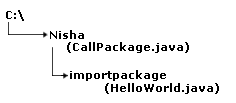
In this program the package "importpackage" is created under the "c:\nisha" directory that will be imported into another program file to call the function of the class "HelloWorld".
Now make a program file named "CallPackage" under the "c:\nisha" directory  importing the package "importpackage".


import importpackage.*;

class CallPackage{
  public static void main(String[] args){
  HelloWorld h2=new HelloWorld();
    h2.show();
  }
}

Out of the program:

C:\nisha\importpackage>javac *.java

C:\nisha\importpackage>cd..

C:\nisha>javac CallPackage.java

C:\nisha>java CallPackage
This is the function of the class HelloWorld!!

Make sure to the directory structure for this program shown as:


» View all related tutorials
Related Tags: c class io nested definition source while ini member e il it not init art ce in no part as

Leave your comment:

Name:

Email:

URL:

Title:

Comments:


Enter Code:

Audio Version
Reload Image
 

Note: Emails will not be visible or used in any way, and are not required. Please keep comments relevant. Any content deemed inappropriate or offensive may be edited and/or deleted.

No HTML code is allowed. Line breaks will be converted automatically. URLs will be auto-linked. Please use BBCode to format your text.

Add This Tutorial To:
  Del.icio.us   Digg   Google   Spurl   Blink   Furl   Simpy   Y! MyWeb 
Training Courses
Tell A Friend
Your Friend Name
Software Solutions
Least Viewed
Most Rated
Recently Viewed
Search Tutorials


Home | JSP | EJB | JDBC | Java Servlets | WAP  | Free JSP Hosting  | Search Engine | News Archive | Jboss 3.0 tutorial | Free Linux CD's | Forum | Blogs

About Us | Advertising On RoseIndia.net  | Site Map

India News

Indian Software Development Company | iPhone Development Company in India | Flex Development Company in India | Java Training Delhi | Java Training at Noida |

Send your comments, Suggestions or Queries regarding this site at roseindia_net@yahoo.com.

Copyright © 2008. All rights reserved.