We can also put a package inside an another package. The packages that comes lower in the naming hierarchy are called "subpackage" of the corresponding package higher in the hierarchy i.e. the package that we are putting into another package is called "su
-950x650.webp)
Create Subpackages (i.e. A Package inside another package)


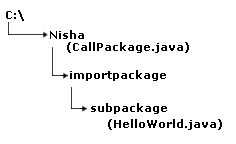
We can also put a package inside an another package. The packages that comes lower in the naming hierarchy are called "subpackage" of the corresponding package higher in the hierarchy i.e. the package that we are putting into another package is called "subpackage". The naming convention defines how to create a unique package name, so that packages that are widely used with unique namespaces. This allows packages to be easily managed. Suppose we have a file called "HelloWorld.java". and want to store it in a subpackage "subpackage", which stays inside package "importpackage". The "HelloWorld" class should look something like this:
package importpackage.subpackage;


public class HelloWorld {


  public void show(){

  System.out.println("This is the function of the class HelloWorld!!");

  }

}
Now import the package "subpackage" in the class file "CallPackage" shown as:
import importpackage.subpackage.*;
|
Out of the program:
| C:\nisha>javac C:\nisha\importpackage\subpackage\HelloWorld.java C:\nisha\importpackage\subpackage>cd.. C:\nisha\importpackage>cd.. C:\nisha>javac CallPackage.java C:\nisha>java CallPackage This is the function of the class HelloWorld!! |
Make sure to the directory structure for this program shown as: