
Java error java.lang.noclassdeffounderror


The Java.lang. noclassdeffounder occurred in a code when the programmer write a wrong class name on the command prompt during the execution or running of the program.
Understand with Example
In this Tutorial we want to describe you a case that helps you in understanding a java.lang.noclassdeffounder.For this we have a class name 'java langnoclassdeffounder'.Inside this main class we have a main method that include -
| Input Stream Reader | This is used to read a byte code that is used to decode byte code into a character stream |
| BufferStream Reader | This is used to read a text character stream present in a input stream reader. |
| readline | This is used to read a number printed on the command prompt. |
On command prompt if the programmer mistakenly write a wrong class name during the running of the program, the code display you an error i.e java langnoclassdeffounder.In this example the programmer write wrong a class name javanoclassdeffounderror1 instead of writing javalangnoclassdeffounderror.Therefore on execution the code show an error java.langnoclassdeffounderror.java. javalangnoclassdefounderror.java
|
import java.io.*; public class javalangnoclassdefounderror { public static void main(String args[]) throws Exception{ InputStreamReader inputStreamReader = new InputStreamReader(System.in); BufferedReader br = new BufferedReader(inputStreamReader); System.out.println("Enter a number : "); String num= br.readLine(); System.out.println("entered nuber is: "+num); } } |
Output
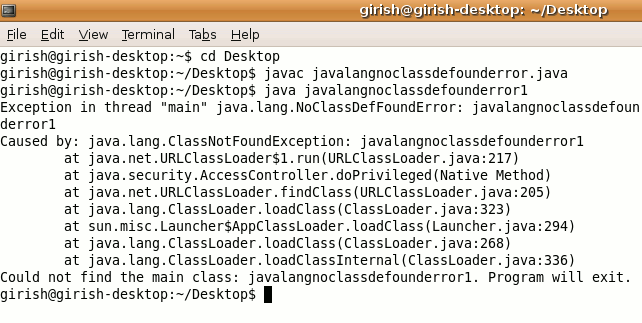
To solve this error you have to check wheather during compile time you have given java file name correct or not.
Download code