In this section, you will learn how to retrieve all the classes from the package by providing the path of the jar file and the package name.

Java Get classes In Package


In this section, you will learn how to retrieve all the classes from the package by providing the path of the jar file and the package name.
The class JarInputStream read the contents of the JAR file. The method getNextJarEntry () reads the JAR file and the positions of the stream at the beginning of the entry data.
The class JarEntry represent a JAR file. The method getName() returns the name of Jar.
Following code adds all the classes of the package getting from the jar in the ArrayList.
| arrayList.add (jarEntry.getName().replaceAll("/", "\\.")) |
Here is the code of GetClassesInPackage.java
|
import java.io.*; import java.util.*; import java.util.jar.*; public class GetClassesInPackage { private static boolean getJar = true; public static List getClasseNamesInPackage (String jarName, String packageName){ ArrayList arrayList = new ArrayList (); packageName = packageName.replaceAll("\\." , "/"); if (getJar) System.out.println ("Jar " + jarName + " for " + packageName); try{ JarInputStream jarFile = new JarInputStream(new FileInputStream (jarName)); JarEntry jarEntry; while(true) { jarEntry=jarFile.getNextJarEntry (); if(jarEntry == null){ break; } if((jarEntry.getName ().startsWith (packageName)) && (jarEntry.getName ().endsWith (".class")) ) { arrayList.add (jarEntry.getName().replaceAll("/", "\\.")); } } } catch( Exception e){ e.printStackTrace (); } return arrayList; } public static void main (String[] args){ List list = GetClassesInPackage.getClasseNamesInPackage ("C://apache-tomcat-6.0.16//lib//jfreechart.jar", "org.jfree.chart.plot"); System.out.println("Found: "+list); } } |
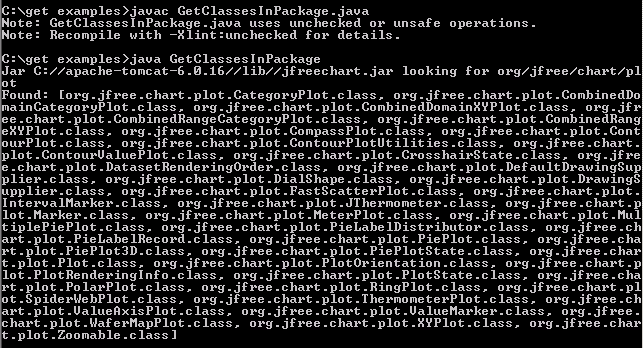
Output will be displayed as: