Designing XML Schema


XML documents can have a reference to a DTD or to an XML Schema.
A Simple XML Document
Look at this simple XML document called "E-mail.xml":
<?xml version="1.0"?> <E-mail> <To>Rohan</To> <From>Amit</From> <Subject>Surprise....</Subject> <Body>Be ready for a cruise...</Body> </E-mail> |
XML Schema
The following example is a XML Schema file called "E-mail.xsd" that defines the elements of the XML document above ("E-mail.xml"):
<?xml version="1.0"?> <xs:schema xmlns:xs="http://www.w3.org/2001/XMLSchema" targetNamespace="http://www.roseindia.net" xmlns="http://www.roseindia.net" elementFormDefault="qualified"> <xs:element name="E-mail">
<xs:complexType>
<xs:sequence>
<xs:element name="To" type="xs:string"/>
<xs:element name="From" type="xs:string"/>
<xs:element name="Subject" type="xs:string"/>
<xs:element name="Body" type="xs:string"/>
</xs:sequence>
</xs:complexType>
</xs:element>
</xs:schema> |
We will discuss the building blocks of this schema latter in this section further.
Add a reference to the above declared XML document
Now this XML document (E-mail.xml) has a reference to above declared XML Schema(E-mail.xsd)
<?xml version="1.0"?> <E-mail xmlns="http://www.roseindia.net" xmlns:xsi="http://www.w3.org/2001/XMLSchema" xsi:schemaLocation="http://www.roseindia.net/Schema E-mail.xsd"> <To>Rohan</To> <From>Amit</From> <Subject>Surprise....</Subject> <Body>Be ready for a cruise...</Body> </E-mail> |
In the above xml document xmlns declares the XML namespaces (we will discuss it in the coming segment of current page).
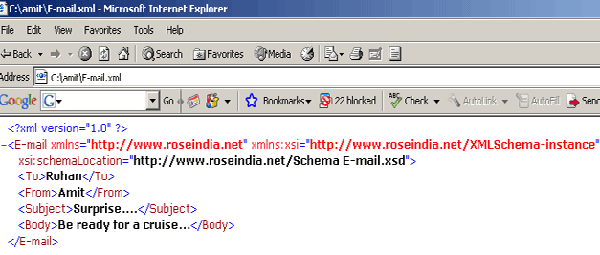
Save E-mail.xml and E-mail.xsd in the same location. Open the file E-mail.xml in a web-browser. You will see the following :
 |
Let's briefly discuss the concept of XML Namespaces
XML Namespaces provide a mechanism to avoid element's name conflicts.
Name Conflicts: Since element names in XML are not predefined, chances for frequency to meet name conflict increases when two different documents use the same element names.
We solve the Name Conflicts using a Prefix with a element name: By using a prefix, we can create two different types of elements. Instead of using only prefixes, we add an xmlns attribute to the conflict causing tags to give the prefix a qualified name .
The XML Namespace (xmlns) Attribute: The XML namespace attribute is placed in the start tag of an element and has the following syntax:
xmlns:namespace-prefix="namespaceURI" |
Example 1(taken from E-mail.xml ) :
| <E-mail xmlns="http://www.roseindia.net" xmlns:xsi="http://www.w3.org/2001/XMLSchema" xsi:schemaLocation="http://www.roseindia.net/Schema" E-mail.xsd"> |
Example 2(taken from E-mail.xsd ) :
| <xs:schema xmlns:xs="http://www.w3.org/2001/XMLSchema" targetNamespace="http://www.roseindia.net" xmlns="http://www.roseindia.net" elementFormDefault="qualified"> |
When a namespace is defined in the start tag of an element, all child elements with the same prefix are associated with the same namespace. In E-mail.xsd "xs" is the defined namespace in the start tag. So it prefixes all the child elements with xs eg...
| <xs:element
name="E-mail"> <xs:complexType> <xs:sequence> <xs:element name="To" type="xs:string"/> <xs:element name="From" type="xs:string"/> <xs:element name="Subject" type="xs:string"/> <xs:element name="Body" type="xs:string"/> </xs:sequence> </xs:complexType> </xs:element> |
Note that the address used to identify the
namespace is not used by the parser to look up information. The only purpose is
to give the namespace a unique name. However, very often companies use
the namespace as a pointer to a real Web page containing information about the
namespace.
Here a Uniform Resource Identifier (URI) is a string of characters which
identifies an Internet Resource.
Default Namespaces : Defining a default namespace for an element saves us from using prefixes in all the child elements. It has the following syntax:
xmlns="namespaceURI" |
We have not included prefixes in all the child element tags( To, From, Subject, Body) in our following example :
| <?xml version="1.0"?> xmlns="http://www.roseindia.net" xmlns:xsi="http://www.w3.org/2001/XMLSchema-instance" xsi:schemaLocation="http://www.roseindia.net/Schema E-mail.xsd"> <To>Rohan</To> <From>Amit</From> <Subject>Surprise....</Subject> <Body>Be ready for a cruise...</Body> </E-mail> |
Building blocks of a XML-Schema
XSD - The <schema> Element
The <schema> element is the root element of every XML Schema:
| <?xml version="1.0"?> <xs:schema> ... ... </xs:schema> |
The <schema> element may contain some attributes like... 0
<?xml version="1.0"?> <xs:schema xmlns:xs="http://http://www.w3.org/2001/XMLSchema" targetNamespace="http://www.roseindia.net" xmlns="http://www.roseindia.net" elementFormDefault="qualified"> ... ... </xs:schema> |
The following code:
xmlns:xs="http://www.w3.org/2001/XMLSchema" |
indicates that the elements and data types used in the schema come from the "http://www.w3.org/2001/XMLSchema" namespace. It also specifies that the elements and data types that come from the "http://www.w3.org/2001/XMLSchema" namespace should be prefixed with xs:
This code segment 1
targetNamespace="http://www.roseindia.net" |
indicates that the elements defined by this schema (E-mail, To, From, Subject, Body.) come from the "http://www.roseindia.net" namespace.
This fragment:
xmlns="http://www.roseindia.net" |
indicates that the default namespace is "http://www.roseindia.net". 2
This fragment:
elementFormDefault="qualified" |
indicates that any elements used by the XML instance document which were declared in this schema must be a namespace qualified.
Referencing a Schema in an XML Document 3
This XML document (E-mail.xml) has a reference to an XML Schema (E-mail.xsd).
<?xml version="1.0"?> <E-mail xmlns="http://www.roseindia.net" xmlns:xsi="http://www.w3.org/2001/XMLSchema" xsi:schemaLocation="http://www.roseindia.net/Schema E-mail.xsd"> <To>Rohan</To> <From>Amit</From> <Subject>Surprise....</Subject> <Body>Be ready for a cruise...</Body> </E-mail> |
The following fragment:
xmlns="http://www.roseindia.net" |
specifies the default namespace declaration. This declaration tells the schema-validator that all the elements used in this XML document are declared in the "http://www.w3schools.com" namespace. 4
Once you have the XML Schema Instance namespace available:
xmlns:xsi="http://www.w3.org/2001/XMLSchema-instance" |
you can use the schemaLocation attribute. This attribute has two values. The first value is the namespace to use. The second value is the location of the XML schema to use for that namespace:
xsi:schemaLocation="http://www.roseindia.net note.xsd" |
5