Excel User Define Error Message
In this section, you will learn , while cell value validation, how to show user defined error message using Apache POI.
EXAMPLE
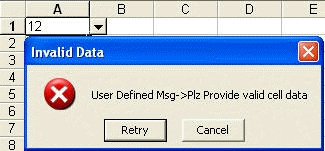
In the below example, the cell A1 is restricted to the values 10, 20 & 30. If you enter other than these value a User Defined Error message will show up. Given below the code :
import java.io.FileNotFoundException;
import java.io.FileOutputStream;
import java.io.IOException;

import org.apache.poi.hssf.usermodel.DVConstraint;
import org.apache.poi.hssf.usermodel.HSSFDataValidation;
import org.apache.poi.hssf.usermodel.HSSFWorkbook;
import org.apache.poi.ss.usermodel.DataValidation;
import org.apache.poi.ss.usermodel.Sheet;
import org.apache.poi.ss.usermodel.Workbook;
import org.apache.poi.ss.util.CellRangeAddressList;

public class XLUserDefineErrorMsg {
public static void main(String args[]) throws FileNotFoundException {
Workbook workbook = new HSSFWorkbook();
Sheet sheet = workbook.createSheet("Data Validation");
CellRangeAddressList addressList = new CellRangeAddressList(0, 0, 0, 0);
DVConstraint dvConstraint = DVConstraint
.createExplicitListConstraint(new String[] { "10", "20", "30" });
DataValidation dataValidation = new HSSFDataValidation(addressList,
dvConstraint);

// USER DEFINE ERROR MESSAGE
dataValidation.setErrorStyle(DataValidation.ErrorStyle.STOP);
dataValidation.createErrorBox("Invalid Data", "User Defined Msg->Plz Provide valid cell data");

sheet.addValidationData(dataValidation);
FileOutputStream fileOut = new FileOutputStream(
"xls/XLUserDefineErrorMsg.xls");
try {
workbook.write(fileOut);
fileOut.close();
} catch (IOException e) {
e.printStackTrace();
}
}
}
OUTPUT
When you enter values other than 10,20 or 30, following message will show up :