
Struts 2 Redirect Action


In this section, you will get familiar with struts 2 Redirect action and learn to use it in the struts 2 application.
Redirect After Post: This post pattern is supported by Struts 2. This is a common pattern in web application. In which an action is redirected to another action. This is a common use to redirect action to display a page.
Redirect Action Result: This redirect pattern is supported by Struts 2. The ActionMapper provided by the ActionMapperFactory is used to redirect the browser to a URL that invokes the specified action. You can see a simple implementation of this in the following struts 2 application.
Redirects Dynamic Parameters: The action-redirect result takes following parameters:
- actionName
- namespace
- method
- encode
- parse
- location
- prependServletContext
Follow the steps to develop a Redirect Action example:
Step 1: Create the
struts.xml file and add the following xml snippet in the struts.xml file.
<?xml version="1.0" encoding="UTF-8" ?>
<!DOCTYPE struts PUBLIC
"-//Apache Software Foundation//DTD Struts Configuration 2.0//EN"
"http://struts.apache.org/dtds/struts-2.0.dtd">
<struts>
<!-- Rose India Struts 2 Tutorials -->
<constant name="struts.enable.DynamicMethodInvocation" value="false" />
<constant name="struts.devMode" value="true" />
<include file="struts-default.xml"/>
<package name="roseindia" namespace="/roseindia" extends="struts-default">
<!-- Redirect Action -->
<action name="showAjaxLoginCancelForm">
<result>/pages/ajaxloginCancel.jsp</result>
</action>
<action name="ajaxloginCancel" class="net.roseindia.Login">
<result name="input">/pages/ajaxloginCancel.jsp</result>
<result name="error">/pages/ajaxloginCancel.jsp</result>
<result name="cancel" type="redirect">/pages/ajaxloginCancel.jsp</result>
<result>/pages/ajaxloginsuccess.jsp</result>
</action>
<!-- Add actions here -->
</package>
<!-- Add packages here -->
</struts>
Step 2 : Create an input form.
ajaxloginCancel.jsp
<%@ taglib prefix="s" uri="/struts-tags"%><html>
<head>
<s:head theme="ajax" debug="true"/>
</head>
<body>
<s:div id="loginDiv" theme="ajax">
<div style="width: 300px;border-style: solid">
<s:form action="ajaxloginCancel" validate="true">
<tr>
<td colspan="2">
Login
</td>
</tr>
<tr>
<td colspan="2">
<s:actionerror />
<s:fielderror />
</td>
<s:textfield name="username" label="Login name"/>
<s:password name="password" label="Password"/>
<s:submit value="Submit" theme="ajax" targets="loginDiv" notifyTopics="/ajaxloginCancel"/>
<s:submit action="showAjaxLoginCancelForm" value="Cancel" onclick="form.onsubmit=null"/>
</s:form>
</div>
</s:div>
</body>
</html>
Step 3 : Create an Action class.
Login.java
package net.roseindia;
import com.opensymphony.xwork2.ActionSupport;
import java.util.Date;


/**
 * <p> Validate a user login. </p>
 */
public class Login extends ActionSupport {


  public String execute() throws Exception {
  if(!getUsername().equals("Admin") || !getPassword().equals("Admin")){
  addActionError("Invalid user name or password! Please try again!");
  return ERROR;
  }
  if(getUsername().equals("Admin") || getPassword().equals("Admin")){
  return SUCCESS;
  }else{
  return NONE;
  }
  }


  // ---- Username property ----

  /**
 * <p>Field to store User username.</p>
 * <p/>
 */
  private String username = null;


  /**
 * <p>Provide User username.</p>
 *
 * @return Returns the User username.
 */
  public String getUsername() {
  return username;
  }

  /**
 * <p>Store new User username</p>
 *
 * @param value The username to set.
 */
  public void setUsername(String value) {
  username = value;
  }

  // ---- Username property ----

  /**
 * <p>Field to store User password.</p>
 * <p/>
 */
  private String password = null;


  /**
 * <p>Provide User password.</p>
 *
 * @return Returns the User password.
 */
  public String getPassword() {
  return password;
  }

  /**
 * <p>Store new User password</p>
 *
 * @param value The password to set.
 */
  public void setPassword(String value) {
  password = value;
  }

}
Step 4 : Create the appropriate validator as shown:
The validation.xml format is either <ActionClassName>-validation.xml or <ActionClassName>-<ActionAliasName>-validation.xml.
Login-validation.xml
<?xml version="1.0" encoding="UTF-8"?>
<!DOCTYPE validators PUBLIC
  "-//OpenSymphony Group//XWork Validator 1.0.2//EN"
  "http://www.opensymphony.com/xwork/xwork-validator-1.0.2.dtd">

<validators>
  <field name="username">
  <field-validator type="requiredstring">
  <param name="trim">true</param>
  <message>Login name is required</message>
  </field-validator>
  </field>
  <field name="password">
  <field-validator type="requiredstring">
  <param name="trim">true</param>
  <message>Password is required</message>
  </field-validator>
  </field>
</validators>
When entered the correct user name and password then the user gets the ajaxloginsuccess.jsp page displaying the entered text
ajaxloginsuccess.jsp
<html>

  <head>

  <title>Login Success</title>

  </head>

  <body>

  <p align="center"><font color="#000080" size="5">
Login Successful !</font></p>
  <h1> Welcome to <%=request.getParameter("username")%>  </h1>

  </body>

</html>
Output:
When this application executes you get the following:
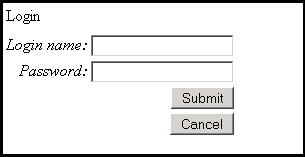
When you don't fill any field and click "Submit" button, you get:
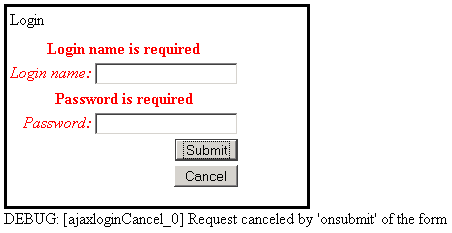
If you click the "Cancel" button then redirect action executes and provides: