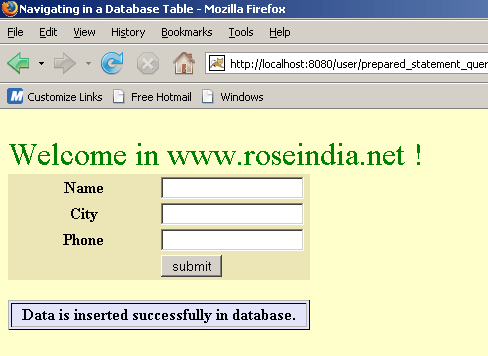
Insert data in mysql database through jsp using prepared statement


This is detailed jsp code that how to insert data into database by using prepared statement instead of statement.
Create a database: First create a database named 'student' in mysql and table named "stu_info" in same database by sql query given below:
|
create database student; create table stu_info ( |
Create a new directory named "user" in the tomcat-6.0.16/webapps and WEB-INF directory in same directory. Before running this java code you need to paste a .jar file named mysql connector.jar in the Tomcat-6.0.16/webapps/user/WEB-INF/lib.
prepared_statement_query.jsp
<!DOCTYPE HTML PUBLIC "-//W3C//DTD HTML 4.01 Transitional//EN"
"http://www.w3.org/TR/html4/loose.dtd" >
      <%@ page import="java.sql.*" %>
<%@ page import="java.io.*" %>
<HTML>
<HEAD>
  <TITLE>insert data using prepared statement </TITLE>
</HEAD>
    <BODY bgcolor="#ffffcc">
  <font size="+3" color="green"><br>Welcome in www.roseindia.net !</font>
  <FORM action="prepared_statement_query.jsp" method="get">
    <TABLE style="background-color: #ECE5B6;" WIDTH="30%" >
         <TR>
	      <TH width="50%">Name</TH>
		  <TD width="50%"><INPUT TYPE="text" NAME="name"></TD>
	  </tr>
      <TR>
	     <TH width="50%">City</TH>
		 <TD width="50%"><INPUT TYPE="text" NAME="city"></TD>
	  </tr>
	  <TR>
	     <TH width="50%">Phone</TH>
		 <TD width="50%"><INPUT TYPE="text" NAME="phone"></TD>
	  </tr>
	  	  <TR>
	      <TH></TH>
		  <TD width="50%"><INPUT TYPE="submit" VALUE="submit"></TD>
	  </tr>
   </TABLE>
<%
   String name = request.getParameter("name");
   String city = request.getParameter("city");
   String phone = request.getParameter("phone");
   /* Create string of connection url within specified
   format with machine name,
    port number and database name. Here machine name id
    localhost and database name is student. */
    String connectionURL = "jdbc:mysql://localhost:3306/student";
          // declare a connection by using Connection interface
    Connection connection = null;
        // declare object of Statement interface that uses for
    executing sql statements.
     PreparedStatement pstatement = null;
         // Load JBBC driver "com.mysql.jdbc.Driver"
     Class.forName("com.mysql.jdbc.Driver").newInstance();
          int updateQuery = 0;

     	 // check if the text box is empty
	 if(name!=null && city!=null && phone!=null){
	 		 // check if the text box having only blank spaces
	     if(name!="" && city!="" && phone!="") {
	                 try {
              /* Create a connection by using getConnection()
              method that takes parameters of string type
              connection url, user name and password to connect
		to database. */
              connection = DriverManager.getConnection
              (connectionURL, "root", "root");
                            // sql query to insert values in the secified table.
              String queryString = "INSERT INTO stu_info(Name,
              Address,Phone) VALUES (?, ?, ?)";
              	      /* createStatement() is used for create statement
              object that is used for
		sending sql statements to the specified database. */
              pstatement = connection.prepareStatement(queryString);
              pstatement.setString(1, name);
			  pstatement.setString(2, city);
			  pstatement.setString(3, phone);
              updateQuery = pstatement.executeUpdate();
                            if (updateQuery != 0) { %>
	           <br>
	           <TABLE style="background-color: #E3E4FA;"
                   WIDTH="30%" border="1">
		      <tr><th>Data is inserted successfully
                    in database.</th></tr>
		   </table>
              <%
              }
            }
            catch (Exception ex) {
            out.println("Unable to connect to batabase.");

               }
            finally {
                // close all the connections.
                pstatement.close();
                connection.close();
            }
	  }
	}
%>
  </FORM>
 </body>
</html>
Save this code as a .jsp file named "prepared_statement_query.jsp" in the directory Tomcat-6.0.16/webapps/user/ and you can run this jsp page with url http://localhost:8080/user/prepared_statement_query.jsp in address bar of the browser.
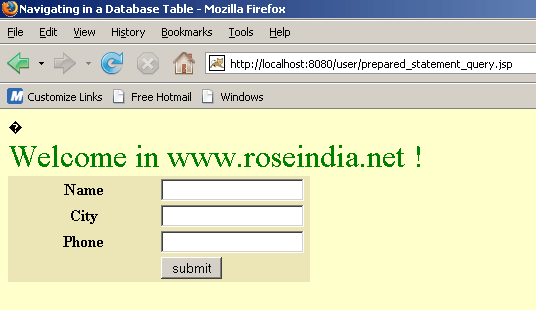
Fill all the fields and click on submit button, that shows a response message. If any field is blank or only blank spaces are there page will remain same after clicking on submit button.