Online Quiz Application in JSP


In this section, we are going to implement of Online quiz application using of JSP.
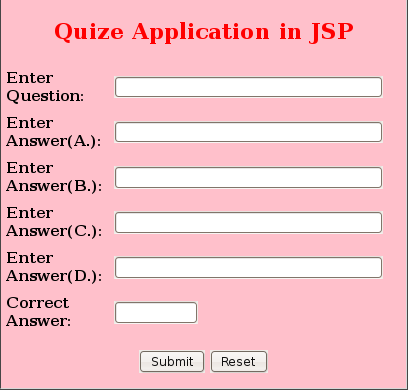
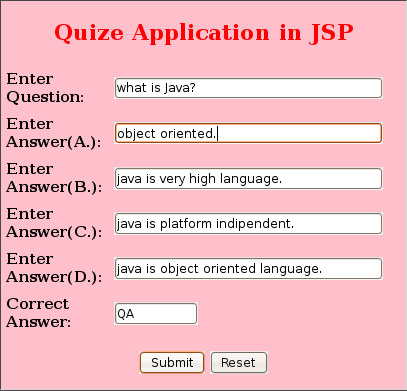
Step 1: Create Question and answer insert form (questForm.jsp) .
In this step first of all create quiz question and answer form using with JSP or JDBC database.
Here is the code.
| <%@page language="java" import="java.sql.*" %> <% if(request.getParameter("submit")!=null) { Connection con = null; String url = "jdbc:mysql://192.168.10.211:3306/"; String db = "amar"; String driver = "com.mysql.jdbc.Driver"; String userName ="amar"; String pass="amar123"; try{ Class.forName(driver); con = DriverManager.getConnection(url+db,userName,pass); try{ Statement st = con.createStatement(); String quest = request.getParameter("quest").toString(); String QA = request.getParameter("QA").toString(); String QB = request.getParameter("QB").toString(); String QC = request.getParameter("QC").toString(); String QD = request.getParameter("QD").toString(); String correctAns = request.getParameter("correctAns").toString(); out.println("quest : " + quest); String qry = "insert into question_deatil(quest,QA,QB,QC,QD,correctAns) values('"+quest+"','"+QA+"','"+QB+"','"+QC+"','"+QD+"','"+correctAns+"')"; out.println("qry : " + qry); int val = st.executeUpdate(qry); con.close(); if(val>0) { response.sendRedirect("quizeApplication.jsp"); } } catch(SQLException ex){ System.out.println("SQL satatment not found"); } } catch(Exception e){ e.printStackTrace(); } } %> <html> <title>Quize application in jsp</title> <head> <script> function validateForm(theForm){ if(theForm.quest.value==""){ //Please enter username alert("Please enter Question."); theForm.quest.focus(); return false; } return true; } </script> </head> <body> <br> <br/> <center> <table border="1" width="450px" bgcolor="pink" cellspacing="0" cellpadding="0"> <tr> <td width="100%"> <form method="POST" action="" onsubmit="return validateForm(this);"> <h2 align="center"><font color="red">Quize Application in JSP</font></h2> <table border="0" width="400px" cellspacing="2" cellpadding="4"> <tr> <td width="50%"><b>Enter Question:</b></td> <td width="50%"><input type="text" name="quest" size="40"/> </td> </tr> <tr> <td width="50%"><b>Enter Answer(A.):</b></td> <td width="50%"><input type="text" name="QA" size="40"/> </td> </tr> <tr> <td width="50%"><b>Enter Answer(B.):</b></td> <td width="50%"><input type="text" name="QB" size="40"/> </td> </tr> <tr> <td width="50%"><b>Enter Answer(C.):</b></td> <td width="50%"><input type="text" name="QC" size="40"/> </td> </tr> <tr> <td width="50%"><b>Enter Answer(D.):</b></td> <td width="50%"><input type="text" name="QD" size="40"/> </td> </tr> <tr> <td width="50%"><b>Correct Answer:</b></td> <td width="50%"><input type="text" name="correctAns" size="10"/> </td> </tr> </table> <center> <p><input type="submit" value="Submit" name="submit"> <input type="reset" value="Reset" name="reset"></p> </center> </form> </td> </tr> </table> </center> </body> </html> |
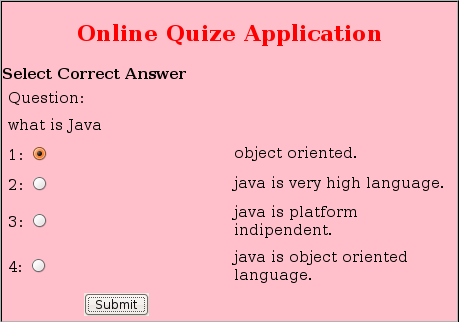
Step 2 : Create "quizeApplication.jsp" for Process the Data and retrieve
the data from database and show the all data on browser.
Here is the code:
| <%@ page import="java.sql.*" %> <!DOCTYPE HTML PUBLIC "-//W3C//DTD HTML 4.01 Transitional//EN" "http://www.w3.org/TR/html4/loose.dtd"> <html> <head> <meta http-equiv="Content-Type" content="text/html; charset=UTF-8"> <title>JSP Page</title> </head> <body> <% String ans=" "; if(request.getParameter("correctAns")!=null) { ans=request.getParameter("correctAns").toString(); } Connection conn = null; while(rs.next()) { |
Output of this Application: