Navigation in a database table through jsp


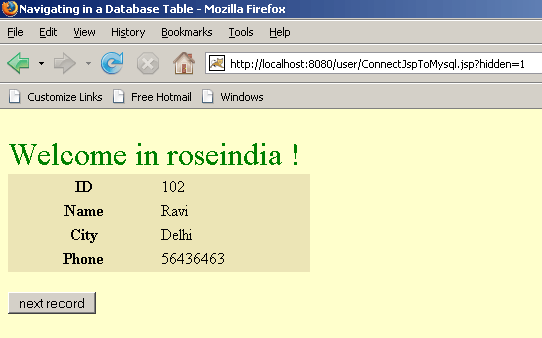
This is detailed jsp code that shows how to navigate in database. This code shows one by one record of student from database on clicking a button labeled 'next record', so on each click of button application fetches next record from database, this is the navigation in database.
Create a database: Before run this jsp code first create a database named 'student' through the sql query given below in mysql command prompt :-
| mysql> create database student; |
Then create a table named 'stu_info' in the same database through following sql query :-
| create table stu_info ( ID int not null auto_increment, Name varchar(20), Address varchar(20), Phone int(15), primary key(ID) ); |
Create a new directory named "user" in the tomcat-6.0.16/webapps and WEB-INF directory in same directory. Before running this java code you need to paste a .jar file named mysql connector.jar in the Tomcat-6.0.16/webapps/user/WEB-INF/lib.
ConnectJspToMysql.jsp
<!DOCTYPE HTML PUBLIC "-//W3C//DTD HTML 4.01 Transitional//EN"
"http://www.w3.org/TR/html4/loose.dtd">
<%@ page import="java.sql.*" %> <%@ page import="java.io.*" %> <HTML>
<HEAD>
<TITLE>Navigating in a Database Table </TITLE>
</HEAD>
<BODY bgcolor="#ffffcc">
<font size="+3" color="green"><br>Welcome in roseindia !</font>
<% int current = 0; // declare a connection by using Connection interface
Connection connection = null;
            /* Create string of connection url within specified
            format with machine name, port number and database
            name. Here machine name id localhost and database
            name is student. */
String connectionURL = "jdbc:mysql://localhost:3306/student"; /*declare a resultSet that works as a table
resulted by execute a specified sql query. */
ResultSet rs = null;
%>
<FORM NAME="form1" ACTION="ConnectJspToMysql.jsp" METHOD="get"><%
if (request.getParameter("hidden") != null) {
current = Integer.parseInt(request.getParameter("hidden"));
}
            // Declare statement.
            Statement statement = null;
            try {
                // Load JDBC driver "com.mysql.jdbc.Driver".
                Class.forName("com.mysql.jdbc.Driver").newInstance();
                /* Create a connection by using getConnection()
                method that takes parameters of string type connection
                url, user name and password to connect to database. */
                connection = DriverManager.getConnection(connectionURL,
                "root", "root");
                /* createStatement() is used for create statement
                object that is used for sending sql statements to
                the specified database. */
                statement = connection.createStatement();
                // executeQuery() method execute specified sql query.
                rs = statement.executeQuery("select * from stu_info");
                for (int i = 0; i < current; i++) {
                    rs.next();
                }
                if (!rs.next()) {
%>
<FONT size="+2" color="red"></b>
<%
        out.println("Sorry ! found some problems with database.");
    } else {
%>
<TABLE style="background-color: #ECE5B6;" WIDTH="30%" >
    <TR><TH width="50%">ID</TH><TD width="50%"> <%= rs.getInt(1)%>
    </TD></tr>
    <TR><TH>Name</TH><TD> <%= rs.getString(2)%> </TD></tr>
    <TR><TH>City</TH><TD> <%= rs.getString(3)%> </TD></tr>
    <TR><TH>Phone</TH><TD> <%= rs.getInt(4)%> </TD></tr>
    </TR>
</TABLE>
<BR>
<INPUT TYPE="hidden" NAME="hidden" VALUE="<%=current + 1%>">
<INPUT TYPE="submit" VALUE="next record">
</FORM>
<%
    }
}
catch (Exception ex) {
%>
<FONT size="+3" color="red"></b>
    <%
                out.println("Unable to connect to database.");
            } finally {
                // close all the connections.
                rs.close();
                statement.close();
                connection.close();
            }
    %>
</FONT>
</FORM>
</body>
</html>
|
Save this code as a .jsp file named "ConnectJspToMysql.jsp" in the directory Tomcat-6.0.16/webapps/user/ and you can run this jsp page with following url in address bar of the browser "http://localhost:8080/user/ConnectJspToMysql.jsp"

When click on button, application control goes to database and check for the next record. If next record is found in table, show in browser else show a error message.
Error message page:
