How to use multiple declaration in jsp


JSP provide two ways to declare variables or methods:
1: Declare in scriptlet :- The scope of this kind of declaration is only in same block.
Example. <% int number, count, flag ; %>
2: Declare in directive :- If we declare in directive, it is applicable in whole page.
Example. <%! int number; %>
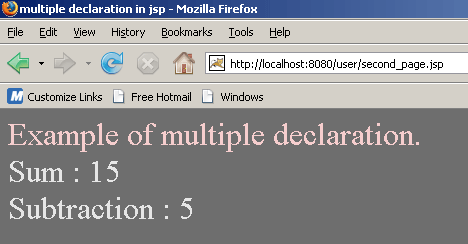
In the jsp code given below, you will learn how to declare multiple variables and methods in jsp that prints the sum of two numbers. Before running this java code create a new directory named "user" in the tomcat-6.0.16/webapps and WEB-INF directory in same directory.
multi_declaration_jsp.jsp
<HTML>
    <HEAD>
        <TITLE>multiple declaration in jsp</TITLE>
    </HEAD>
    <BODY bgcolor="#6E6E6E">
<font size="+3" color="#F6CECE">Example of multiple declaration.</font>
	<!-- multiple declaration of variables and methods -->
	<%! int num1 = 10; %>
	<%! int num2 = 5; %>
	<%! int add(){
		return num1+num2; }
	%>
	<%! int sub() {
         return num1-num2;
	}
	%>
	<br>
    <font size="+3" color="#E6E6E6">Sum : <%= add()%></font>
	<br>
    <font size="+3" color="#E6E6E6">Subtraction : <%= sub()%></font>
</body>
</html>
|
Save this code as a .jsp file named "multi_declaration_jsp.jsp" in the directory Tomcat-6.0.16/webapps/user/ and you can run this jsp page with url http://localhost:8080/user/multi_declaration_jsp.jsp in address bar of the browser.