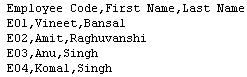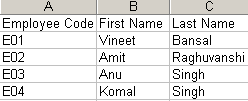
Export Data into CSV file uing JDBC in JSP


CSV file : A CSV file is commonly known as a Comma Delimited File or a Character Separated File.
Step : 1 Import the packages .
<%@ page import="java.io.*,java.sql.*"%>
Step : 1 .Create a Table "employee_details" in the database.
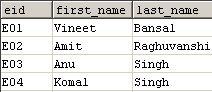
Step : 2 Create a folder "csv"
in the C:\ Drive.
Step : 3.Create a Page ("CsvJdbcFile.jsp") to export data into CSV file
"myjdbcfile.csv".
| <%@ page import="java.io.*,java.sql.*"%> <html> <body> <% String filename = "c:\\csv\\myjdbcfile.csv"; Connection conn = null; String url = "jdbc:mysql://localhost:3306/"; String dbName = "user_register"; String driver = "com.mysql.jdbc.Driver"; String userName = "root"; String password = "root"; Statement stmt; try { FileWriter fw = new FileWriter(filename); fw.append("Employee Code"); fw.append(','); fw.append("First Name"); fw.append(','); fw.append("Last Name"); fw.append('\n'); Class.forName(driver).newInstance(); conn = DriverManager.getConnection(url+dbName,userName,password); String query = "select * from employee_details"; stmt = conn.createStatement(); ResultSet rs = stmt.executeQuery(query); while(rs.next()) { fw.append(rs.getString(1)); fw.append(','); fw.append(rs.getString(2)); fw.append(','); fw.append(rs.getString(3)); fw.append('\n'); } fw.flush(); fw.close(); conn.close(); out.println("<b>You are Successfully Created Csv file.</b>"); } catch (Exception e) { e.printStackTrace(); } %> </table> </body> </html> |
Output :
After successfully created csv file message is display.

"myjdbcfile.csv"