Connect from database using JSP Bean file


Java Beans are reusable components. It is used to separate Business logic from the Presentation logic. JSP provides three basic tags for working with Beans.
- <jsp:useBean id=?bean name?
class=?bean class? scope = ?page | request |
session |application ?/>
bean
name = the name that refers to the bean.
bean class = name of the java class that defines the bean.
- <jsp:setProperty name = ?id?
property = ?someProperty? value =
?someValue? />
id = the name of the bean as specified in the use
property
= name of the property to be passed to the bean.
value
= value of that particular property.
A variant for this tag is the property attribute can be replaced by an ? * ?. What this does is that it accepts all the form parameters and thus reduces the need for writing multiple setProperty tags. The only consideration is that the form parameter names should be the same as that of the bean property names.
- <jsp:getProperty name = ?id?
property = ?someProperty? />
Here
the property is the name of the property whose value is to be obtained from the
bean.
BEAN SCOPES :
Bean scope defines the
range and lifespan of the bean.
There are three different
options as :
-
Page scope
-
Request scope
-
Session scope
For more detail visit: http://www.roseindia.net/jsp/usingbeansinjsp.shtml
Table we are using in this example is having structure like this:
| CREATE TABLE `message` ( `id` int(11) NOT NULL auto_increment, `message` varchar(256) default NULL, PRIMARY KEY (`id`) ) |
In this example we have made a connection using Java Bean file named bean.java which is defined in a package named myexample. "bean.java" has a constructor which is loading the appropriate driver for connecting this bean to the MySQL database and then we have made the properties setter and getter for "msgid" and "message". After defining "setter" and "getter", we created a method "insert()" which is inserting values into database. Code for "bean.java" is as follows:
1. bean.java
package myexample;

import java.io.*;

import java.sql.Connection;

import java.sql.DriverManager;

import java.sql.Statement;

import java.sql.ResultSet;


public class bean

{


  private int msgid;

  private String message;

  private Connection connection=null;

  private ResultSet rs = null;

  private Statement st = null;

  String connectionURL = "jdbc:mysql://192.168.10.59/messagepaging";


  public bean()

  {

 try {

 // Load the database driver

  Class.forName("com.mysql.jdbc.Driver");

  // Get a Connection to the database

  connection = DriverManager.getConnection(connectionURL, "root", "root");

  }catch(Exception e){

  System.out.println("Exception is ;"+e);

  }


  }

  public void setmsgid(int msgid)

  {

  this.msgid = msgid;

  }


  public int getmsgid()

  {

  return (this.msgid);

  }


  public void setmessage(String message)

  {

  this.message = message;

  }


  public String getmessage()

  {

  return (this.message);

  }


  public void insert()

  {


 try

 {

  String sql = "insert into message(id,message)

 values('"+msgid+"','"+message+"')";

  Statement s = connection.createStatement();

  s.executeUpdate (sql);

  s.close ();

  }catch(Exception e){

  System.out.println("Exception is ;"+e);

  }

  }

 }
For using and calling methods of this bean file we have to make entry for bean class in jsp file with its package name if exists. Here in our example tag <jsp:useBean> is doing the loading of bean file from the classes.
| <jsp:useBean id="sample" class="myexample.bean" scope="page"> <jsp:setProperty name="sample" property="*"/> </jsp:useBean> |
In this defined bean file, id is like an alias for the bean which can be used to invoke all methods of this bean file. As we have done in our example JSP page by writing <% sample.insert() %>. Full code for JSP page is given as below:
2. jspBean.jsp
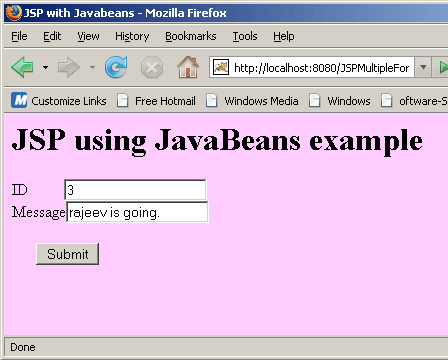
| <%@ page language="Java" import="java.sql.*" %> <html> <head><title>JSP with Javabeans</title></head> <body bgcolor="#ffccff"> <h1>JSP using JavaBeans example</h1> <form name="form1" method="POST"> ID <input type="text" name ="msgid"> <br> Message<input type="text" name ="message"> <br> <br> <input type = "submit" value="Submit"> <jsp:useBean id="sample" class="myexample.bean" scope="page"> <jsp:setProperty name="sample" property="*"/> </jsp:useBean> </form> <% sample.insert();%> </body> </html> |
To run this example you have to follow these steps:
- Create and save "bean.java".
- Put this package "myexample" in the classes folder of WEB-INF.
- Create and save jspBean.jsp .
- Type the following path in address bar "http://localhost:8080/JSPMultipleForms/jspBean.jsp" here we have written this code in JSPMultipleForms folder you can make your as you wish.
- JSP page would open and after filling values click "Submit". This will call bean and insert value into database.
Output: