Implementing CSS and JavaScript in JSP File


This example shows how to implement css and JavaScript in jsp. Here we have created three main files that is cssScript.jsp, validate.js and style.css.
In "cssScript.jsp" file, the following code imports style.css file from css folder
| <link rel="stylesheet" href="../css/style.css" type="text/css"></link> |
and the code below imports validate.js file from script folder.
|
<script language="JavaScript" type="text/JavaScript" src="../script/validate.js"></script> |
The style.css file is used to implement the style for the jsp page i.e. look and feel for the page and the validate.js file is used for field validation.
Directory Structure of css and script file

cssScript.jsp
| <%@page language="java" session="true" contentType="text/html;charset=ISO-8859-1" %> <!DOCTYPE html PUBLIC "-//W3C//DTD XHTML 1.0 ransitional//EN" "http://www.w3.org/ TR/xhtml1/DTD/xhtml1-transitional.dtd"> <html xmlns="http://www.w3.org/1999/xhtml"> |
style.css
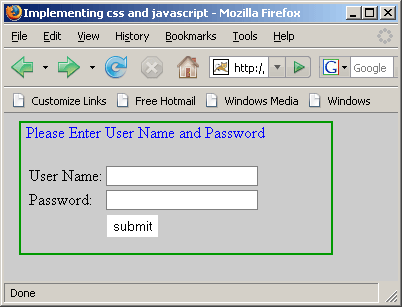
| body{ background-color: #CCCCCC; border: 2px solid #009900; height: 130px; width: 300px; margin-left: 15px; padding-left:5px; padding-right:5px; } .inputbox { background-color:#FFFFFF; color: #333333; width:150px; border-width:1px; border-style:solid; border-color:#808080; } .inputbox:hover { border-width:1px; border-style:solid; border-color:#11A3EA; } .inputbox:focus { border-width:1px; border-style:solid; border-color:#11A3EA; color: #0F4987; } .submitButton { background-color: #ffffff; color: #000000; background: #ffffff; border: 1px solid #cccccc; text-align: center; width: auto; padding: 2px 3px 2px 3px; } |
validate.js
| function validate(theForm){ if(theForm.user.value.length==0){ alert("UserId can't be blank"); theForm.user.focus(); return false; }else if(theForm.pass.value.length==0){ alert("Password can't be blank"); theForm.pass.focus(); return false; }else if(theForm.pass.value.length<6){ alert("Password length can't be less than 6 char"); theForm.pass.focus(); return false; } } |
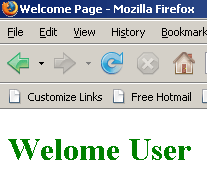
Welcome.html
| <html> <head> <title>Welcome Page</title> </head> <body> <P><h1><font color='green'> Welome User </font></h1></P> </body> </html> |
Running program through this url- http://localhost:8080/ExampleServlet/jsp/cssScript.jsp the page is displayed as below:
If user successfully enters the valid input value then the following Welcome.html page appears.