Get Column names using Metadata in jsp


This section illustrates you how to get column names from the database using metadata in jsp.
Here we are providing you an example that retrieves all column names from a database table student1. Create a table student1 which contains student_id, student_name and student_address. With this example, we have to retrieve the column names using metadata. ResultSetMetaData provides methods that are used to get the characteristics of ResultSet such as number of columns, information about the columns i.e. datatype, length, scale, nullability.
Table structure of student1
| create table student ('student_id' int ,'student_name' varchar (256), 'student_address' varchar(256)); |
Here is the code of jspMetadata.jsp
| <%@ page import="java.sql.*,java.io.*" %> <html> <head> <title>Getting Column Names using Metadata</title> </head> <body> <h2>Column Names of table "Student1"</h2> <% Connection con=null; ResultSet rs=null; Statement stmt=null; ResultSetMetaData md; try{ Class.forName("com.mysql.jdbc.Driver"); String url="jdbc:mysql://192.168.10.59/anu?user=root&password=root"; con=DriverManager.getConnection(url); stmt=con.createStatement(); } catch(Exception e){ System.out.println(e.getMessage()); } try{ stmt = con.createStatement(); rs = stmt.executeQuery("SELECT * FROM student1"); md = rs.getMetaData(); int count = md.getColumnCount(); out.println("<table border=1>"); out.print("<tr>"); for (int i=1; i<=count; i++) { out.print("<th>"); out.print(md.getColumnName(i)); } out.println("</tr>"); out.println("</table>"); } catch (SQLException ex) {} %> </body> </html> |
Description of the code
In the above example,
1) Import the packages java.sql.*, java.io.*
2) Load the database driver which creates the connection with mysql
database by Class.forName("com.mysql.jdbc.Driver") inside the
try-catch.
3) Then create jdbc connection by con=DriverManager.getConnection(url).
The URL consist of jdbc:mysql, host address, database, username and password of
mysql like: jdbc:mysql://192.168.10.59/anu?user=root&password=root".
4) After establishing the connection, create statement by using the
method stmt=con.createStatement() to get the column names.
5) It
will return the resultset which have the method stmt.executeQuery()
to execute the statement.
6) ResultSet have the method getMetadata() which returns the metadata
object and provides meta information of the resultset.
7) The method md.getColumnCount() of ResultSetMetadata object returns the
number of columns for the resultset from the query:
SELECT * FROM student1.
8) Then call the method md.getColumnName() which will return
the column names from ResultSetMetadata object.
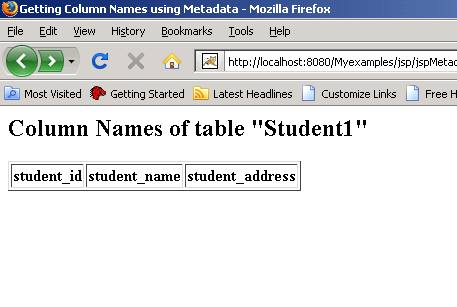
Then the following output will be displayed.
Here is the output.