How to use 'for' loop in jsp page?


This is detailed java code that shows how to use 'for'
loop in jsp page. 'if' statement is used to test conditions while 'for'
loop is used to define a loop that reiterates statements. It specifies initialization variables,
exit condition and the
statements to be executed for the
loop. In this example, we have developed use_for_loop.jsp
page which shows the use of 'for' in JSP.
use_for_loop.jsp
<!DOCTYPE HTML PUBLIC "-//W3C//DTD HTML 4.01 Transitional//EN"
"http://www.w3.org/TR/html4/loose.dtd">
<HTML>
<HEAD>
<TITLE>table generator.</TITLE>
</HEAD>
<BODY bgcolor="#6E6E6E">
<FORM NAME="form1" ACTION="use_for_loop.jsp"
METHOD="get">
<table bgcolor="#D8D8D8">
<p><font color="#F8E0F7">Enter number for
which you want to create <br>table
and limit of table here.</font></p>
<tr>
<td> Enter number </td>
<td><input type="text" name="num"></td>
</tr>
<tr>
<td> Enter limit </td>
<td><input type="text" name="limit"></td>
</tr>
<tr align="center"><td></td>
<td><INPUT TYPE="submit" VALUE="show table"></td>
</table><br>
<table bgcolor="#F6E3CE" border="1" width="23%">
            <%
	      /* here if statement will check that text
boxes are empty or value in text boxes
		  are null */
	     if (request.getParameter("num")
!= null && request.getParameter("limit") != null){
             if (request.getParameter("num")
!= "" && request.getParameter("limit") != "") {
	          // use for loop
                  for (int i = 0; i <
Long.parseLong(request.getParameter("limit")); i++) {
            %>
            <tr align="center">
                <td><%= request.getParameter("num")%>
 * <%= (i + 1)%></td>
                <td><%= (
Long.parseLong(request.getParameter("num")) * (i + 1))%></td>
            </tr>
            <% }
                }
            }%>
        </FORM>
    </body>
</html>
|
Save this code as a .jsp file named "use_for_loop.jsp" in the application directory of tomcat server and run this jsp page with url "http://localhost:8080/user/use_for_loop.jsp" in address bar of the browser.
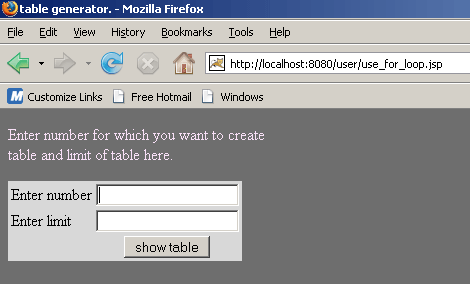
When user enter integer value in appropriate text box
and click on show table button.
For this example, suppose user enters number is 5
and limit is 10.
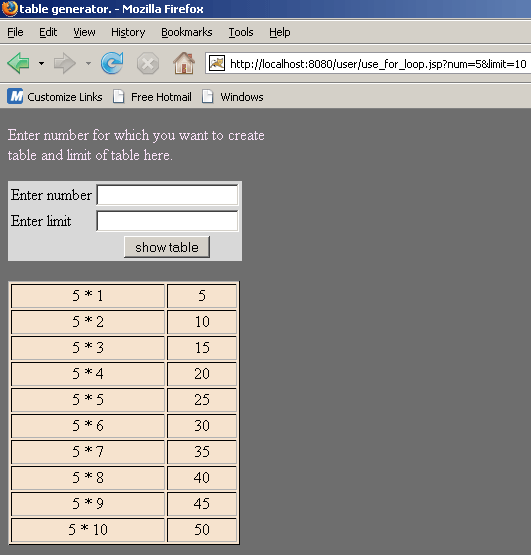
This page show the table of 5 of the limit 10.