Draw Statistical chart in jsp


This section illustrates you how to draw statistical chart in jsp by getting values from database..
To draw a bar chart, we have used JFreeChart Library. JFreeChart is a chart library used to generate different variety of charts. Download jar file: jfreechart.jar and jcommon.jar
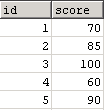
Create a table in the database:
The class JDBCCategoryDataset provides the implementation over a database
JDBC result set. Its constructor consists of url, driver, user, pass to connect
to the database. The method executeQuery( query) executes the query
against the existing database connection.
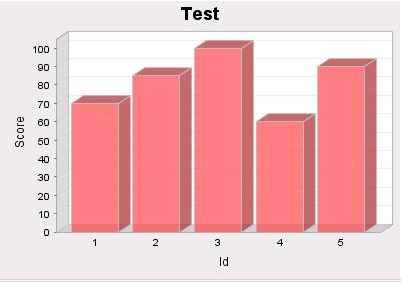
The class ChartFactory provides the utility methods for creating charts. The method createBarChart3D() creates a vertical 3D bar chart. The class PlotOrientation is used to indicate the orientation (horizontal or vertical) of a 2D plot.
The class ChartUtilities includes methods for converting charts to image formats (PNG and JPEG). The method saveChartAsJPEG(new File("C:/chart.jpg") saves a chart to a file specified in JPEG format.
Here is the code of bar.jsp
| <%@ page import="java.sql.*" %> <%@ page import="java.io.*" %> <%@ page import="org.jfree.chart.ChartFactory" %> <%@ page import="org.jfree.chart.ChartUtilities" %> <%@ page import="org.jfree.chart.JFreeChart" %> <%@ page import="org.jfree.chart.plot.PlotOrientation"%> <%@ page import="org.jfree.data.*" %> <%@ page import="org.jfree.data.jdbc.JDBCCategoryDataset"%> <% String query="SELECT * from chart"; JDBCCategoryDataset dataset=new JDBCCategoryDataset("jdbc:mysql://localhost:3306/chart", "com.mysql.jdbc.Driver","root","root"); dataset.executeQuery( query); JFreeChart chart = ChartFactory .createBarChart3D( "Test", "Id", "Score", dataset, PlotOrientation.VERTICAL,true, true, false); try { ChartUtilities.saveChartAsJPEG(new File("C:/chart.jpg"), chart, 400, 300); } catch (IOException e) { System.out.println("Problem in creating chart."); } %> |
To run the above example start the tomcat and enter http://localhost:8080/application/jsp/bar.jsp to the address bar and hit enter. The image of chart is displayed in the file specified in the given location.