Cookie Example to Store and Show only 10 values


Example program to show last 10 Cookies value
This cookie example illustrates how you can manage cookie value in your JSP page. This example is saving and displaying cookies and also it is managing cookies size in such manner that if cookie size becomes greater than a limit (e.g 10 in this case), it will automatically deletes the oldest cookie from the list. Cookies age can be set using the following code:
| setMaxAge(365*24*60*60) |
User can add new cookie by entering the cookie name and value from the JSP page. On the form submit event user input will be added into cookie array by the following method:
| response.addCookie(<cookie name>) |
We are managing cookies by the cookie age. If the cookie ages is set to zero then it will be deleted. We are using the MaxAge property of the cookie to delete the cookie. To delete any cookie you can set its MaxAge to zero e.g. MaxAge="0".
| <% if(cookies.length >=10) { int start=cookies.length-10; cookies[start].setMaxAge(0); response.addCookie(cookies[start]); } %> |
Full JSP code is given as below:
1. CookieHandling.jsp
| <%@ page import="java.util.*" %> <% Cookie[] cookies = request.getCookies(); if (cookies == null) cookies = new Cookie[0]; String name = request.getParameter("name"); Cookie added = null; if (name!=null && name.length()>0) { added = new Cookie(name,name); response.addCookie(added); added.setMaxAge(365*24*60*60); } %> <HTML><HEAD> <TITLE>Cookie List</TITLE> </HEAD> <BODY> <% for (int i=0; i<cookies.length-1; i++) { out.println("Cookie Value Number :"+i+" and value "+cookies[i].getName()); out.println("<br>"); if (added!=null && added.getName().equals(cookies[i].getName())) added = null; } if (added != null) out.println("New Symbol: "+added.getName()); %> <% if(cookies.length >=10) { int start=cookies.length-10; cookies[start].setMaxAge(0); response.addCookie(cookies[start]); } out.println("Length of cookie is "+cookies.length); %> <FORM> <P>Get Cookie Value<INPUT TYPE='TEXT' NAME='name'></P> <INPUT TYPE='SUBMIT' VALUE='Submit'> </FORM> </BODY> </HTML> |
Output:
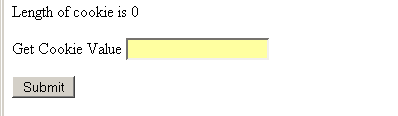
First time when JSP page would run then it looks like that
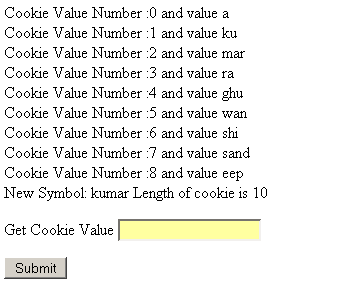
As and when we store new values in cookie it will add till 10 values
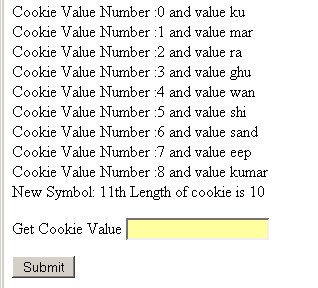
as soon as we will add 11th value then first will be deleted.
 this value will be
deleted from the JSP page.
this value will be
deleted from the JSP page.