
getAttributeNames() Method Of The Request Object


This section provides you the detailed explanation of the getAttributeNames() method of the request object in JSP. Here, you will learn why this is used and how it is used in the JSP application.
Here, you will see that three files are provided in this section. These files are as follows:
- GetAttributeNamesMethod.html
- GetAttributeNamesMethod.jsp
- GetAttributeNamesMethod1.jsp
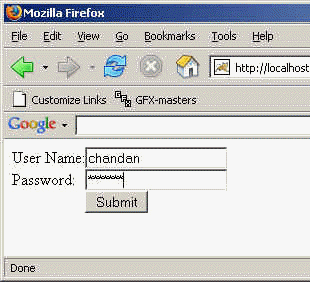
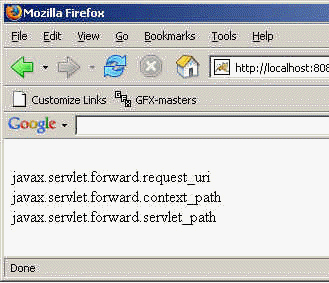
First is the GetAttributeNamesMethod.html file which is used for constructing a html form with two fields user name and another is for the password. When you submit the form GetAttributeNamesMethod.jsp file is called which sets all the setting you can see in the code and redirect to the another JSP file GetAttributeNamesMethod1.jsp file that gets the request and response object sent by the RequestDispatcher in the GetAttributeNamesMethod page and through the retrieved request and response object you can get all the attribute name by using the getAttributeNames() method in the enumerated form i.e. retrieved one by one through the enumerating the retrieved data.
Here is the code of the GetAttributeNamesMethod.html file:
<html> <body> <form action="GetAttributeNamesMethod.jsp" method="post"> <table border="0" cellspacing="0" cellpadding="0"> <tr> <td>User Name: </td> <td><input type="text" size="20" name="txtUserName" /> </tr> <tr> <td>Password: </td> <td><input type="password" size="20" name="txtPassword" /> </tr> <tr> <td> </td> <td><input type="submit" value="Submit" name="B1" /></td> </tr> </table> </form> </body> </html>
Output for the GetAttributeNamesMethod.html file:
Here is the JSP code of the GetAttributeNamesMethod.jsp file:
<%
	String username, password;
	if(request.getParameter("txtUserName") == null)
		username = "";
	else
		username = request.getParameter("txtUserName");

	if(request.getParameter("txtPassword") == null)
		password = "";
	else
		password = request.getParameter("txtPassword");
%>

<%
	String strViewPage="GetAttributeNames1.jsp";
	RequestDispatcher dispatcher = request.getRequestDispatcher(strViewPage);
	if (dispatcher != null){
		dispatcher.forward(request, response);
	}
%>
Here is the JSP code of the GetAttributeNamesMethod1.jsp file:
<%@page import="java.util.*" %>
      <%
	for(Enumeration e = request.getAttributeNames(); e.hasMoreElements(); ){
		String attName = (String)e.nextElement();
		out.println("<br/>" + attName);
	}
%>
Output for the above mentioned JSP code:
Download the GetAttributeNamesMethod.html file.