Home Jsf Jsftraining Using redirect element & wild card


Using redirect element & wild card
Posted on: December 30, 2008 at 12:00 AM
is an optional element which can be used to specify that the response is generated by the new view using redirect response rather than rendering the response as the current request.

Using redirect element & wild card


<redirect/> is an optional element which can be used to specify that the response is generated by the new view using redirect response rather than rendering the response as the current request. If we don't specify this element then the address bar shows the current page address even the response is generated by other page.

Specify navigation rule like below:

<navigation-rule>
   <from-view-id>/page/*</from-view-id>
   <navigation-case>
   <from-outcome>login</from-outcome>
   <to-view-id>/login.jsp</to-view-id>
   <redirect/>
   </navigation-case> 
</navigation-rule>

  • This navigation rule is defined for every jsf page of view id like "/page/*". Here * represents all the jsp pages in the page directory.
  • redirect element is used to show the new page url to the address bar.


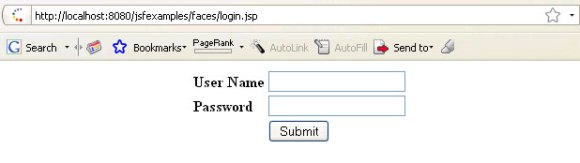
Clicking the button redirects you to the login.jsp page as shown below: You can see the new page address at the address bar.

Download code for all examples

Related Tags for Using redirect element & wild card:
credirectioviewrenderingsedrequestvinewusingresponseelementrenderifietoedioptioncigenerateecanusepecurrentinasmntcaoptionalesspecemdirendmeratewhichsrectspdirectespatquestisirhassriringrenthsthatndono


More Tutorials from this section

Ask Questions?    Discuss: Using redirect element & wild card  

Post your Comment


Your Name (*) :
Your Email :
Subject (*):
Your Comment (*):
  Reload Image


Ask Questions?

If you are facing any programming issue, such as compilation errors or not able to find the code you are looking for.

Ask your questions, our development team will try to give answers to your questions.