JavaFX 3D Effect Example


We can create an Object in JavaFX and can give him 3D Effect (like Creating Sphere with Circle and 3D text by blurring Text in background).
To create 3D effect we have to use ?javafx.scene.effect? package.
package javafx3deffect; import javafx.scene.paint.*; import javafx.application.*; import javafx.scene.effect.*; import javafx.scene.geometry.*; import javafx.application.Stage; import javafx.scene.geometry.Circle; import javafx.scene.paint.Color; import javafx.animation.Timeline; import javafx.animation.Interpolator; import javafx.animation.KeyFrame; import javafx.ext.swing.Button; import javafx.input.MouseEvent; import javafx.scene.text.Text; import javafx.scene.Font; import javafx.scene.FontStyle; /** * @author Amit */ var val:Integer; var t=Timeline { repeatCount: Timeline.INDEFINITE autoReverse:true keyFrames : [ KeyFrame { time : 0s values:val=>0 0 },KeyFrame { time : 4s values:val=>400 tween Interpolator.EASEBOTH 1 } ] } 2 Frame { title: "Painting Variations" width: 500 3 height: 400 closeAction: function() { java.lang.System.exit( 0 ); 4 } visible: true stage: Stage { 5 content: [ Text { font: Font { 6 size: 24 style: FontStyle.PLAIN } 7 x: 0, y: 20 content: "HelloWorld" effect:GaussianBlur{radius:10} 8 scaleX:3.4 scaleY:3.4 }, 9 Circle { centerX: bind val, centerY: 40 radius: 60 0 opacity:0.6 fill: RadialGradient{ centerX:30 1 centerY:10 radius:30 proportional:false 2 stops:[ Stop {offset: 0.3 color: Color.GREEN}, Stop {offset: 1.0 color:Color.DARKGREEN } 3 ] } onMouseMoved: function( e: MouseEvent ):Void { 4 t.start(); } },Text { 5 font: Font { size: 24 style: FontStyle.PLAIN 6 } x: 10, y: 30 content: "HelloWorld" 7 fill:RadialGradient{ centerX:60 centerY:30 8 radius:60 proportional:false stops:[ 9 Stop {offset: 0.3 color: Color.GREEN}, Stop {offset: 1.0 color:Color.LIGHTGREEN } ] 0 } scaleX:3 scaleY:3 1 } ] } 2 } |
Output:
 3
3

JavaFX Transformation Example 4
We can create an Object and then can apply transformation on this object as we wish. We can Translate, Scale, Rotate any object.
package javafxtransformation; import javafx.ext.swing.Label; 5 import javafx.ext.swing.Canvas; import javafx.ext.swing.Button; import javafx.scene.paint.Color; 6 import javafx.ext.swing.TextField; import javafx.ext.swing.GridPanel; import javafx.ext.swing.SwingFrame; 7 import javafx.ext.swing.FlowPanel; import javafx.ext.swing.BorderPanel; import javafx.scene.geometry.Rectangle; 8 /** * @author Amit */ 9 var rotationValue:Number=10; var rotationText =TextField { columns: 5 0 text: "{rotationValue}" editable: true } 1 var scaleValue:Number=1; var scaleText =TextField { columns: 5 2 text: "{scaleValue}" editable: true } 3 var translateXValue:Number; var translateXText =TextField { columns: 3 4 text: "{translateXValue}" editable: true } 5 var translateYValue:Number; var translateYText =TextField { columns: 3 6 text: "{translateYValue}" editable: true } 7 var translate = GridPanel{ rows:1 columns:4 8 content:[Label { text: "X :" },translateXText, 9 Label { text: "Y :" },translateYText 0 ] } SwingFrame { 1 title: "Transformation" width: 800 height: 600 2 closeAction: function() { java.lang.System.exit( 0 ); } 3 visible: true content: BorderPanel { top: Canvas { 4 content:Rectangle { x: 100, y: 50 width: 100, height: 20 5 fill: Color.GREEN anchorX:100 anchorY:100 6 // Rotate rotate: bind rotationValue // Scale 7 scaleX: bind scaleValue scaleY: bind scaleValue // Translate 8 translateX: bind translateXValue translateY: bind translateYValue } 9 } bottom:GridPanel{ columns:3 0 rows:3 content: [ Label { text: "Rotate By :" 1 }, Label { text: "Scale By :" }, Label { 2 text: "Translate To :" },rotationText, scaleText, 3 translate, Button { text: "Rotate" 4 action: function() { rotationValue = java.lang.Double.parseDouble(rotationText.text); } 5 },Button { text: "Scale" action: function() { 6 scaleValue = java.lang.Double.parseDouble(scaleText.text); } },Button { 7 text: "Translate" action: function() { translateXValue=java.lang.Double.parseDouble(translateXText.text); 8 translateYValue=java.lang.Double.parseDouble(translateYText.text); } }] 9 } } } 0 |
Output:

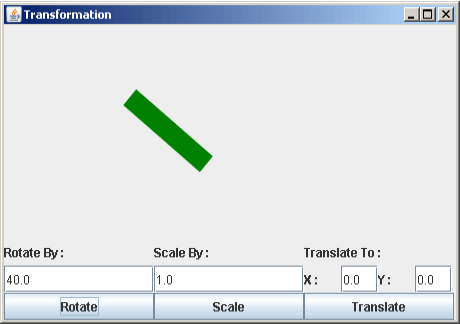
Rotating rectangle by 40 degree. 1
Scale rectangle by 2.
 2
2
Translate Rectangle according to X-axis and Y-axis position.
