--Ads--
Java program to pass values from one form to another form in JSP

Pass values from form to form


Java program to pass values from one form to another
form in JSP
There are many occasions when the programmer need to
pass some value to many pages in their application. For example in a
shopping cart application programmer wants that if user have logged once then
until it logs out his name should be displayed on the other page of the
application. So it is most frequently used in to the different
applications. Here in the JSP (Java Server Pages) we can pass values by
the two ways:
First, if we have to only pass values
from one page to another consecutive page which is being called then we can get
these values by using the implicit object request to call the method request.getAttribute("parameter
name").
Second, we can pass the parameters value
to many pages by making the session true for those pages and the value which is
to pass must be set by the method session.setAttribute("attribute
name").
In our this example program we have used both ways to
pass values to different pages. Here we have created three JSP pages.
FirstForm.jsp
<%@ page language="java" session="true"%>

<h1> <font face="Comic Sans MS" color="#000080">

  Input Information -First Page</font> </h1>

<form name="frm" method="post" action="SecondForm.jsp">

<table width="485" height="172" border="0"

   bordercolor="#003300" bgcolor="#003300">

  <tr>

  <td width="121" height="37"> <font size="4"

   color="#FFFFFF" face="Comic Sans MS">

  <b> First Name</b></font> </td>

  <td colspan="2" height="37" width="348">

   <input name="firstname" type="text" align="left" size="38"/>

  </td>

  </tr>

  <tr>

  <td height="39" width="121"><b><font size="4"

   color="#FFFFFF" face="Comic Sans MS">

   Last Name</font></b> </td>

  <td colspan="2" height="39" width="348">

  <input name="lastname" type="text" align="left" size="38"/>

  </td>

  </tr>

  <tr>

  <td height="39" width="121"><b><font size="4"

  color="#FFFFFF" face="Comic Sans MS">Password</font>

  </b></td>

  <td colspan="2" height="39" width="348">

   <input name="password" type="password" align="left"/>

   </td>

  </tr>

 <tr>

  <td colspan="3" height="41" width="475">

  <input name="submit" type="submit" align="left" value="Next"/>

   </td>

  </tr>

</table>

</form>
|
SecondForm.jsp
<%@ page language="java" session="true"%>

<div align="right" ><font face="Comic Sans MS"

  color="#000080">Welcome <u>

  <%=request.getParameter("firstname")%></u>

  </font>

</div>

<% session.setAttribute("password",request.getParameter("password"));%>

<h1> <font face="Comic Sans MS" color="#000080">

   Fill more information</font> </h1>

<form name="frm2" method="post" action="FinalResult.jsp">

<table width="485" height="172" border="0"

  bordercolor="#003300" bgcolor="#003300">

  <tr>

  <td width="121" height="37"> <font size="4"

  color="#FFFFFF" face="Comic Sans MS">

  <b> First Name</b></font> </td>

  <td colspan="2" height="37" width="348">

  <input name="firstname2" type="text" align="left" size="38"

   value="<%=request.getParameter("firstname")%>"/></td>

  </tr>

  <tr>

  <td height="39" width="121"><b><font size="4"

  color="#FFFFFF" face="Comic Sans MS">Last Name

  </font></b> </td>

  <td colspan="2" height="39" width="348">

  <input name="lastname2" type="text" align="left" size="38"

  value="<%=request.getParameter("lastname")%>"/></td>

  </tr>

  <tr>

  <td height="39" width="121"><b><font size="4"

   color="#FFFFFF" face="Comic Sans MS">Address</font></b></td>

  <td colspan="2" height="39" width="348">

   <input name="address" type="text" align="left"/></td>

  </tr>

 <tr>

  <td colspan="3" height="41" width="475">

   <input name="submit" type="submit" align="left" value="Show"/>

  </td>

  </tr>

</table>

</form>
|
FinalResult.jsp
<%@ page language="java" session="true"%>


First Name : <%=request.getParameter("firstname2") %><br>

Last Name  : <%=request.getParameter("lastname2") %><br>

Password : <%=session.getAttribute("password") %><br>

Address  : <%=request.getParameter("address") %><br>
|
Output:
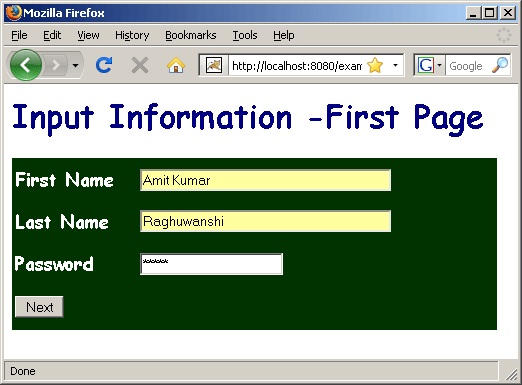
Input information into the first page and then it will
be passed to the next page

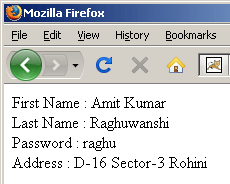
Now all the information will be get at the third page
and will be displayed on the FinalResult.jsp
Download Source
Code
