
Today we are going to learn the most fundamental concepts in Java which is known as Exception Handling.
Exception Handling in Java: A Complete Beginner’s to Advanced Guide - Explained with examples


This is a complete tutorial on exception handling in Java for beginners to advanced programmers. You learn the basics and advanced topics in Exception handling in Java. At the end of the tutorial we have provided many examples of Exception Handling in Java. These examples will help you in mastering the important conception of handling handling in the programming language. So. Let's get started.
Introduction Summary
Exception handling is one of the most fundamental concepts in Java and every developer should master the concept. It is very important to handle exceptions in programs to build reliable, secure, and production-ready applications. In real-world application you may face many issues and due these issues exceptions are thrown. So, it's not so easy to develop production ready code. You should write code to handle situations like invalid user input, missing files, network failures, and runtime errors. Java's powerful exception handling mechanism, which provides a structured and powerful way to detect, handle, and recover from such problems without crashing the application. Developers should learn exception handling well and practice with many examples. This will give them skills to develop program error free.
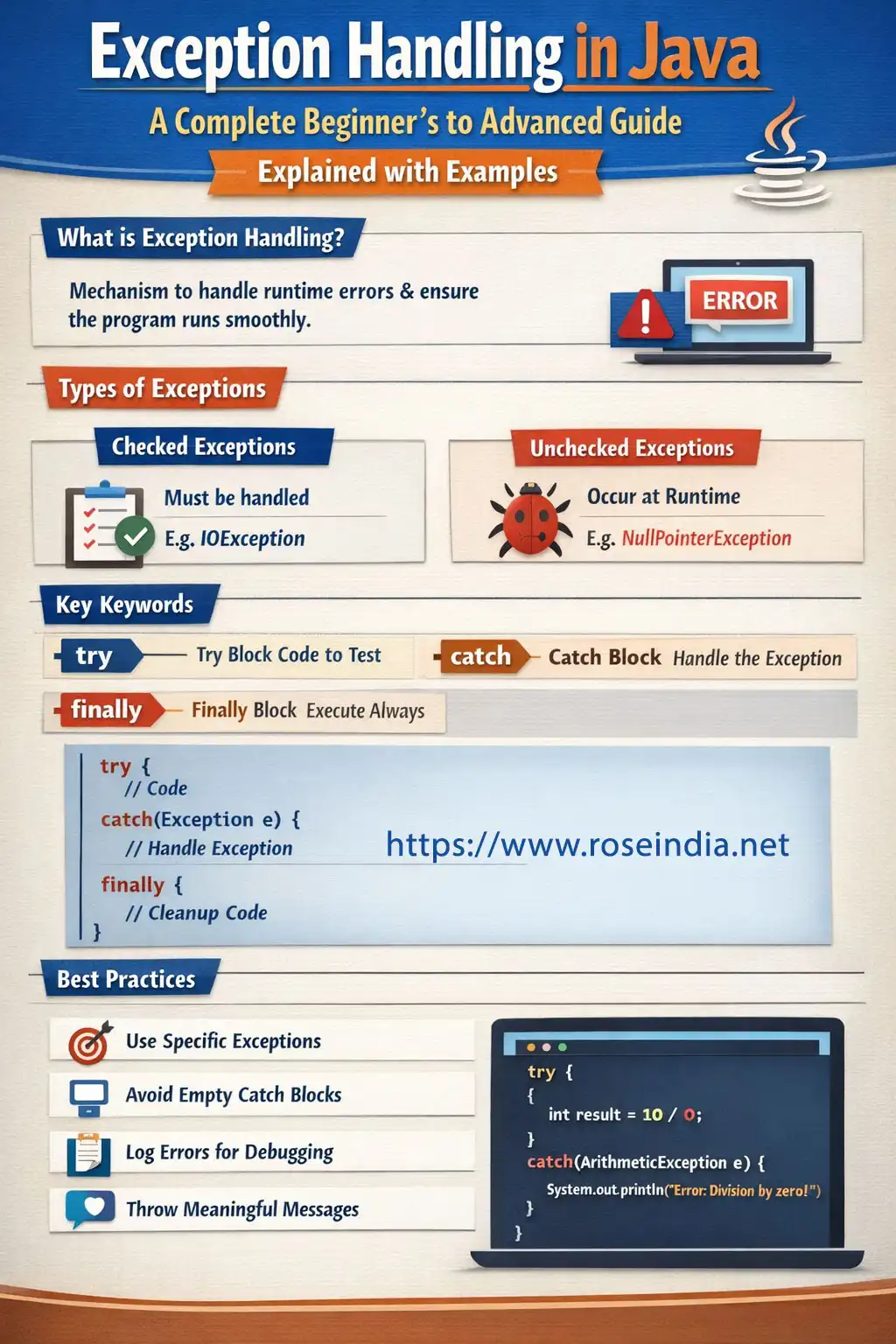
This is the complete beginner-to-advanced guide written from the ground to explain exception handling in Java very well. You will get started with understanding what exceptions are, why Java introduced them, and how the exception hierarchy works. As the article progresses, you’ll explore core keywords like try, catch, finally, throw, and throws, learn the difference between checked and unchecked exceptions, and discover how the JVM handles exceptions internally. We have also provided the examples in this tutorial that teaches the advanced topics such as custom exceptions, exception chaining, performance considerations, and best practices followed in enterprise-level Java applications.
By the end of this tutorial you will be able to develop an error free application by handling the exceptions in the right way. If you are learning Java for the first time or a developer preparing for interviews, or a professional working on real-world systems, this article is for you. You will master exception handling the right way and our tutorial is supported with many real-world examples.
Exception handling is one of the most critical—and often misunderstood—concepts in Java. While beginners usually learn how to use try, catch, and finally, professional Java developers must understand why exceptions exist, how the JVM handles them internally, and how to design clean, maintainable exception-handling strategies.
In this comprehensive guide, you’ll move from basic exception handling concepts to advanced, real-world Java exception handling techniques used in enterprise-grade applications.
Whether you are:
- New to Java
- Preparing for interviews
- Writing production-level backend code
- Building Spring Boot or microservices applications
This guide will give you a strong foundation and advanced insights.
1. What Is Exception Handling in Java?
An exception is an abnormal condition that occurs during the execution of a program and disrupts its normal flow, sometimes it crashes the application as well. Exception handling is the process of handling such issues in the program so that programs normal execution is not stopped. It helps programs prevent crashing. Exception handling refers to the process of handling the abnormal conditions occurring in the program at run-time.
In Java, exceptions are represented as objects, created at runtime and propagated through the call stack until they are handled or cause program termination.
Exception handling is a structured way to:
- Detect runtime problems
- Transfer control to error-handling code
- Recover gracefully or fail safely
Key Idea
Exceptions separate error-handling logic from normal business logic.
This separation is one of the reasons Java is widely used for large-scale and mission-critical systems.
2. Why Java Introduced Exception Handling
Before Java, error handling was usually done using:
- Error codes
- Return values
- Global flags
These approaches had major drawbacks:
- Errors were easy to ignore
- Code became unreadable
- No enforcement at compile time
Java solved this by:
- Treating errors as objects
- Enforcing handling for recoverable conditions
- Providing a well-defined exception hierarchy
3. Java Exception Hierarchy Explained in Depth
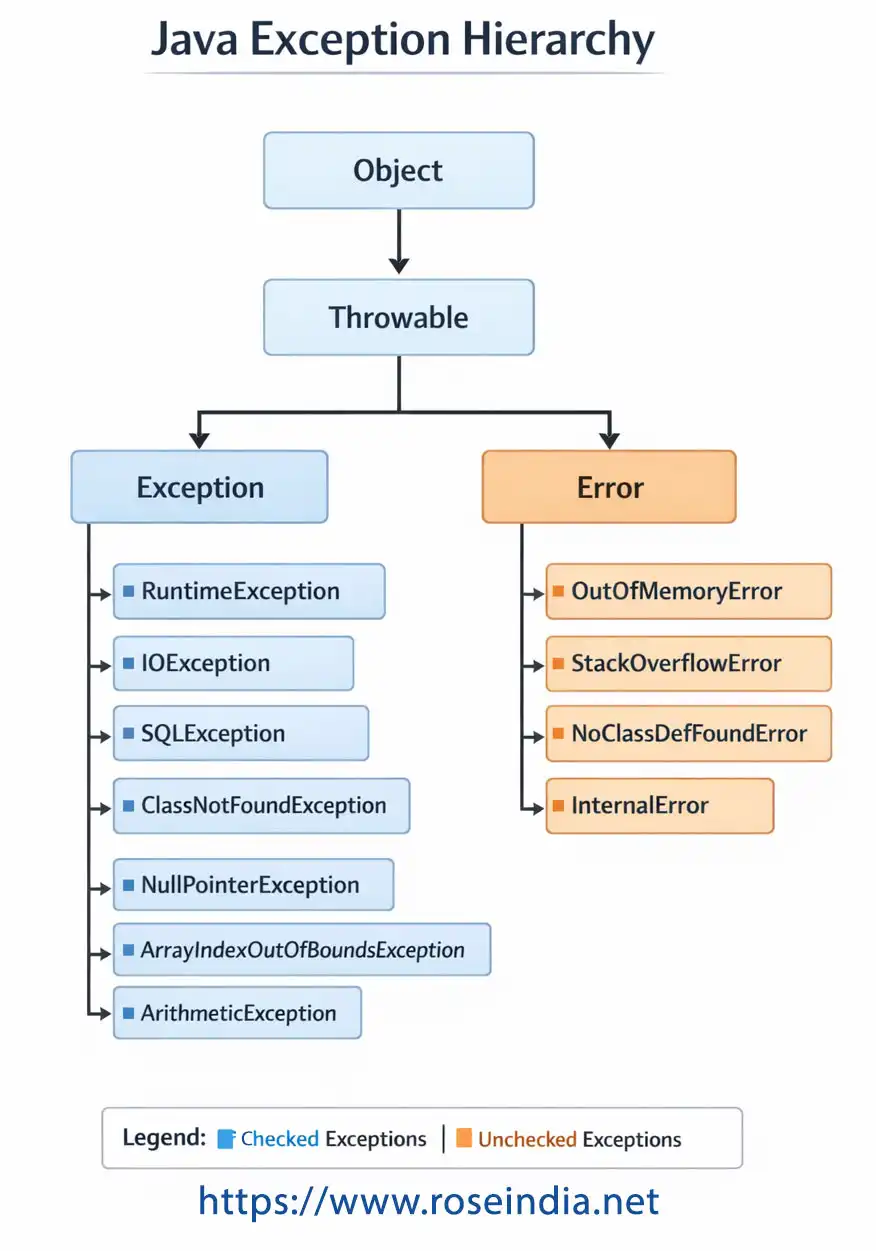
All exceptions and errors in Java extend the Throwable class.
Object
└── Throwable
├── Exception
│ ├── Checked Exceptions
│ └── RuntimeException (Unchecked)
└── Error
3.1 Throwable Class
The root of the exception hierarchy.
It provides key methods:
- getMessage()
- printStackTrace()
- getCause()
3.2 Exception Class
Represents conditions that a program might want to catch and handle.
Checked Exceptions
Checked at compile time.
Examples:
- IOException
- SQLException
- ClassNotFoundException
FileReader reader = new FileReader("file.txt"); // Must be handled
Checked exceptions represent recoverable conditions, such as missing files or network issues.
03.3 RuntimeException (Unchecked Exceptions)
Unchecked exceptions occur at runtime and are not enforced by the compiler.
Examples:
- NullPointerException
- ArithmeticException
- ArrayIndexOutOfBoundsException
- IllegalArgumentException
They usually indicate programming bugs.
1
String s = null;
System.out.println(s.length()); // NullPointerException
3.4 Error Class
Errors represent serious system-level problems.
Examples:
- OutOfMemoryError
- StackOverflowError
- VirtualMachineError
These are not meant to be handled by applications.
24. How Exception Handling Works Internally (JVM View)
When an exception occurs:
- JVM creates an exception object
- The current method stops execution
- JVM searches for a matching catch block
- If not found, it propagates up the call stack
- If unhandled, JVM terminates the program
This process is known as stack unwinding.
5. Core Keywords in Java Exception Handling
Java provides five keywords:
3- try
- catch
- finally
- throw
- throws
Understanding how they interact is essential for writing robust code.
6. The try Block: Defining Risky Code
The try block contains code that may throw an exception.
try {
int result = 10 / 0;
}
Rules:
4- Must be followed by catch or finally
- Cannot exist alone
7. The catch Block: Handling Exceptions
A catch block handles a specific exception type.
catch (ArithmeticException e) {
System.out.println(e.getMessage());
}
Catching Multiple Exceptions
try {
int[] arr = new int[5];
arr[10] = 5;
} catch (ArithmeticException | ArrayIndexOutOfBoundsException e) {
System.out.println("Exception occurred");
}
8. Catch Order Matters
Always catch child exceptions before parent exceptions.
❌ Incorrect:
5catch (Exception e) {}
catch (ArithmeticException e) {}
✅ Correct:
6catch (ArithmeticException e) {}
catch (Exception e) {}
9. The finally Block: Guaranteed Execution
The finally block executes regardless of exception occurrence.
7Use cases:
- Closing files
- Releasing database connections
- Cleaning up resources
finally {
System.out.println("Cleanup completed");
}
⚠️ Even if return is used, finally still executes.
10. Try-With-Resources (Java 7+)
Introduced to avoid resource leaks.
8
try (FileReader reader = new FileReader("file.txt")) {
// use reader
} catch (IOException e) {
e.printStackTrace();
}
Resources must implement AutoCloseable.
11. The throw Keyword
Used to explicitly throw an exception.
throw new IllegalArgumentException("Invalid input");
9Common use cases:
- Validating method arguments
- Enforcing business rules
12. The throws Keyword
Declares exceptions that a method may pass to the caller.
void readData() throws IOException {
0FileReader reader = new FileReader("data.txt");
}
This supports exception propagation.
113. Checked vs Unchecked Exceptions: Design Debate
| Aspect | Checked | Unchecked |
| Compile-time check | Yes | No |
| Represents | Recoverable issues | Programming bugs |
| API design | Forces handling | Flexible |
| Used in | IO, DB, Networking | Logic errors |
Modern frameworks often prefer unchecked exceptions to reduce boilerplate.
14. Creating Custom Exceptions
Custom exceptions make code more expressive.
Creating Checked Exception
class InvalidUserException extends Exception {
 public InvalidUserException(String message) {
  super(message);
 }
}
Creating Unchecked Exception
class InvalidUserException extends RuntimeException {
  public InvalidUserException(String message) {
    super(message);
  }
}
15. When to Use Custom Exceptions
Use custom exceptions when:
2- Business rules fail
- Domain-specific errors occur
- Meaningful error communication is required
Avoid creating exceptions for trivial conditions.
16. Exception Chaining
Exception chaining preserves the original cause.
catch (SQLException e) {
  throw new DataAccessException("DB error", e);
}
This is critical for debugging production issues.
317. Logging Exceptions Properly
Never ignore exceptions.
Bad practice:
catch (Exception e) {}
Good practice:
4
catch (Exception e) {
  logger.error("Error occurred", e);
}
18. Performance Impact of Exceptions
Exceptions are expensive operations.
Avoid:
- Using exceptions for normal flow
- Throwing exceptions inside loops
Exceptions should represent exceptional conditions only.
519. Common Beginner & Intermediate Mistakes
- Catching Exception everywhere
- Swallowing exceptions
- Overusing checked exceptions
- Poor exception messages
- Ignoring root causes
20. Exception Handling in Enterprise Applications
In real-world applications:
- Exceptions flow across layers
- Controllers map exceptions to HTTP responses
- Global handlers centralize logic
Example (Spring-style concept):
- Service throws exception
- Controller advice handles it
- User receives clean error message
21. Exception Handling Best Practices
✅ Catch specific exceptions
✅ Use meaningful exception names
✅ Preserve stack trace
✅ Separate technical and business exceptions
✅ Log once, not multiple times
✅ Fail fast for invalid input
22. Interview Questions on Exception Handling
Q: Can finally block be skipped?
Yes, if JVM crashes or System.exit() is called.
Q: Difference between throw and throws?
throw creates exception, throws declares it.
Q: Can we catch multiple exceptions?
Yes, using multi-catch.
Q: Is Error recoverable?
No.
23. Real-World Example: Input Validation
public void withdraw(double amount) {
  if (amount <= 0) {
    throw new IllegalArgumentException("Invalid amount");
  }
}
24. Exception Handling vs Error Handling
| Exception | Error |
| Application-level | System-level |
| Recoverable | Non-recoverable |
| Should be handled | Should not be handled |
Exception Handling Examples
Here are the examples of Exception Handling in Java
- What Is an Exception
- In this section, you will learn about the Java exception and its types.
-
Catching and Handling Exceptions -The three exception handler components are used to catch and handle the exceptions. These are try, catch and finally clause.
- Catching Normal Exceptions
-The exceptions that are generated by methods are referred to as normal exceptions. We have already learned that to catch an exception we use try and catch bl...
- Exception Classes- The hierarchy of exception classes commence from Throwable class which is the base class in java.lang. This class can be instantiated and thrown by the program.
-
Handling Multiple Catch Clauses - So far we have seen how to use a single catch block, now we will see how to use more than one catch blocks in a single try block.
-
How to create custom exception in Java? - In this tutorial you will learn How to create custom exception in Java?
-
How to Fix java.lang.NullPointerException in Java - In depth Guide
- In this detailed blog post I will show you how you can fix java.lang.NullPointerException
occurring in your Java
-
Java Exceptions Tutorials With Examples - Exceptions are nothing but some anomalous conditions that occur during the execution of the program.
- How to Throw Exceptions
- Before catching an exception it is must to be thrown first. This means that there should be a code somewhere in the program that could catch the exception.
-
How to Print a Stack Trace Message - This page discusses - How to Print a Stack Trace Message
- Java Exceptions Tutorials With Examples
- Exceptions are nothing but some anomalous conditions that occur during the execution of the program. Exceptions are the conditions or typically an event which may inter...
-
Java AclNotFoundException Class Hierarchy Diagram - This class extends the java.lang.Exception class. An application throws such exception when tried to make a reference to s...
-
Java ActivationException Class Hierarchy Diagram - In this section we will discuss about the class hierarchy of ActivationException Class in Java.
-
Java AlreadyBoundException Class Hierarchy Diagram
- In this section we will discuss about the class hierarchy of AlreadyBoundException Class in Java.
-
Java ApplicationException Class Hierarchy Diagram - In this section we will discuss about the class hierarchy of ApplicationException Class in Java.
-
Java AWTException Class Hierarchy Diagram - In this section we will discuss about the class hierarchy of AWTException Class in Java.
-
Java BackingStoreException Class Hierarchy Diagram
- In this section we will discuss about the class hierarchy of BackingStoreException Class diagram in Java.
-
Java BadAttributeValueExpException Class Hierarchy Diagram
- In this section we will discuss about the BadAttributeValueExpException Class diagram in Java.
-
Java BadBinaryOpValueExpException Class Hierarchy Diagram
- In this section we will discuss about the BadBinaryOpValueExpException diagram in Java.
-
Java BadLocationException Class Hierarchy Diagram - In this section we will discuss about the javax.swing.text.BadLocationException class diagram in Java.
-
Java BadStringOperationException Class Hierarchy Diagram
- In this section we will discuss about the javax.management.BadStringOperationException
class diagram in Java.
-
Java BrokenBarrierException Class Hierarchy Diagram In this section we will discuss about the java.util.concurrent.BrokenBarrierException class diagram in
Java.
-
Java CertificateException Class Hierarchy Diagram - In this section we will discuss about the javax.security.cert.CertificateException class hierarchy diagram.
-
Java ClassNotFoundException Class Hierarchy Diagram
- In this section we will discuss about the java.lang.ClassNotFoundException class hierarchy diagram.
-
Java Exception Class Hierarchy Diagram - The class
Exception and its subclasses are defined in such a way that an
application may generate a condition which might be caught.
- Number Format Exception
- NumberFormatException is a type of RuntimeException which is generated when a programmer try to convert String into integer.
- Making Custom (User Defined) Exceptions
- Learn how to Making Custom (User Defined) Exceptions.
- Nested Try-Catch Blocks
- In Java we can have nested try and catch blocks. It means that, a try statement can be inside the block of another try.
- How to Print a Stack Trace Message
- As we have seen that java provides a method getMessage()
method that is used with an object of the Exception class to print
errors to debug the process.
-
Java throw and throws Keyword Example - This section will describe you how to throw exception/s in Java.
- Java Throw Built-in Exception
- In this section we are discussing about throwing of built-in exceptions in Java.
- Difference between throw and throws in java.- Throws
and throw both are keywords in java, used for handling the exception.
When a method is not able to handle the checked exception, it should
declared..
- What are Chained Exceptions? - Whenever in a program the first exception causes an another exception, that is termed as Chained Exception. Java provides new functionality for chaining exce...
25. Summary
Exception handling is not about avoiding errors, but about handling failures gracefully.
8By mastering:
- Exception hierarchy
- Checked vs unchecked exceptions
- Custom exceptions
- Best practices
- Performance considerations
You move from being a Java beginner to a professional developer.
Related Tutorials:
9- What Is an Exception
- Exception Classes
- Catching and Handling Exceptions
- List of Java Exceptions
- Exception Handling in Java with try catch
- Java Exception Class Hierarchy Diagram
- Class Cast Exception Example in Java
- Exception handling in Java
- Java Exception Handling Examples
- Logging an Exception in Java
- What are Chained Exceptions?
- Java Tutorials